

The Costco Price Adjustment Countdown: A 30-Day Timeline You Can Actually Picture

Quick answer: Costco gives members 30 days from the purchase date to claim a price adjustment if an item drops in price, according to Costco's publicly posted membership policies. The countdown starts the day you buy the item, not the day you notice the drop, so the clock is already running before you even get your receipt in the door. Picture it as five checkpoints — purchase, price drop, discovery, claim, refund — and missing any one of them by even a day can cost you the difference.
Key takeaways
- The 30-day price adjustment window starts on your purchase date, according to Costco's membership policy — not when you spot the lower price.
- Electronics often carry a shorter adjustment window than general merchandise, so the standard 30-day countdown doesn't apply to every item.
- You can request an adjustment in person at the membership counter or by phone, and having your receipt or order number ready speeds things up.
- The single biggest reason shoppers lose eligible refunds is timing — they find the price drop on day 32 instead of day 20.
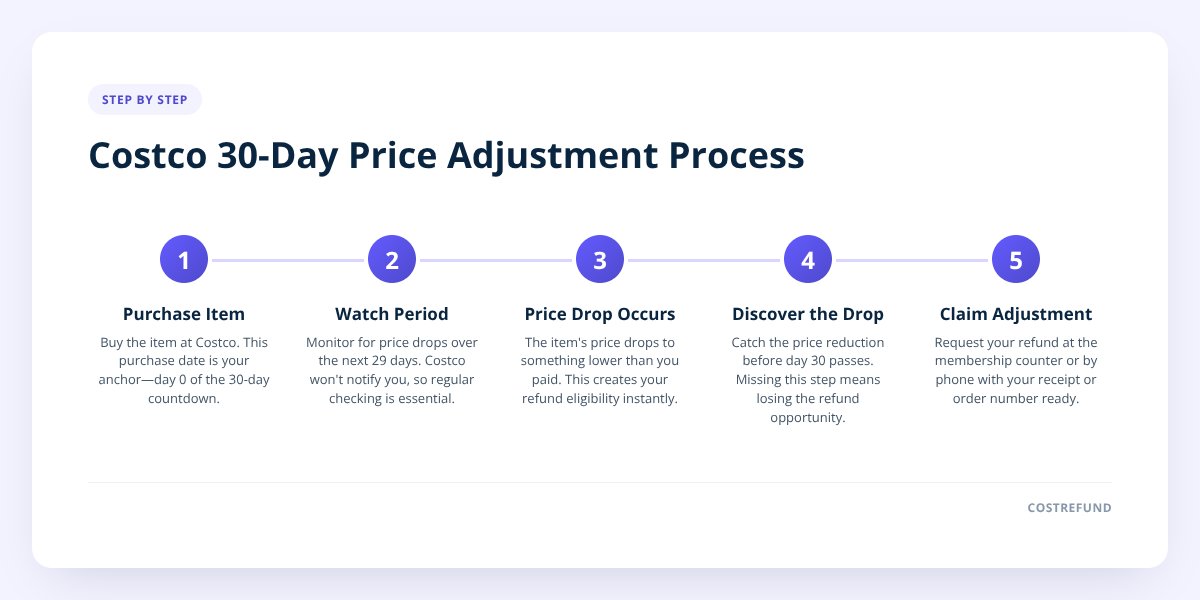
What does the 30-day price adjustment timeline actually look like?
It looks like a five-step countdown, and once you see it laid out, the whole process stops feeling confusing. Here's the visual breakdown:
- Day 0 — You buy the item. This is your anchor date. Everything else on the calendar counts forward from this exact day, so note it or keep the receipt somewhere you won't lose it.
- Day 1–29 — The watch period. Costco doesn't notify you when a price drops, so this stretch is on you (or on an app doing it for you). Prices can shift with no warning, especially on seasonal or high-turnover items.
- The moment of the drop — Your trigger event. The instant the shelf tag or online price changes to something lower than what you paid, your refund eligibility is created. This can happen on day 3 or day 28 — there's no pattern to rely on.
- Discovery — You (or your app) catch it. This is the step most people fumble. If you don't know the drop happened, you can't act on it, and the eligibility quietly expires when day 30 passes.
- Day 30 — The hard cutoff. Once this date passes, Costco's policy no longer supports a retroactive adjustment for that purchase, so anything caught after this point is simply too late.
We mapped this exact window in more detail in The Costco Return Window Explained, including what specifically counts as a "trigger" for eligibility.
Why does day 30 matter so much more than any other day?
Because it's a hard stop, not a soft suggestion — once it passes, the refund opportunity is gone for that item, according to Costco's stated adjustment policy. There's no grace period built into the public policy, no rounding up to "about a month." If your purchase was July 6, your window closes August 5, full stop.
This is where most missed refunds happen. Not because people don't care about saving money, but because a 30-day window is just long enough to forget about. You buy a $600 TV, move on with life, and by the time a sale catches your eye in week five, the purchase has already aged out.
Don't skip this: Mark your purchase date the day you buy something, not the day you think to check for a price drop. A 30-day window that starts silently is the easiest deadline in the world to miss.
How do you actually catch a price drop before day 30 runs out?
You catch it by checking regularly or by letting something check for you automatically — manual tracking works, but it's the slower, less reliable path. If you're doing it manually, here's the realistic version of what that takes:
- Save every receipt, physical or digital, and log the purchase date somewhere you'll actually look again.
- Check Costco's website or app for that exact item every few days, not just once.
- Watch in-warehouse tags too, since some price drops show up on the floor before they show up online.
- Compare the price you paid against the current listed price, item by item.
- Flag anything that's dropped and calculate the difference before you forget which items you were tracking.
That's five ongoing tasks per item, repeated for every purchase, for 30 days each. It adds up fast if you shop at Costco regularly. This is the exact gap CostRefund was built to close — you scan your receipt once, and the app watches the 30-day window for you, sending an alert the moment an eligible item drops in price.
Does the 30-day rule apply the same way to everything you buy?
No — some categories run on different timelines, and assuming the standard rule applies everywhere is one of the more expensive mistakes shoppers make. Electronics in particular often follow a shorter adjustment window than the rest of the warehouse.
| Category | Typical adjustment window | What to watch for |
|---|---|---|
| General merchandise | 30 days from purchase | Standard countdown, no known exceptions |
| Electronics | Often shorter than 30 days | Confirm the specific window before assuming standard timing |
| Gas | Not eligible under standard policy | Fuel pricing works differently — no adjustment window applies |
| Warehouse markdowns | Varies by item and location | Often first-come, first-served rather than date-based |
We go deeper on the electronics exception in Costco Price Adjustments on Electronics, and cover why fuel purchases don't fit the same model in Costco Price Adjustments on Gas. If you're not sure which bucket an item falls into, treat it as the shorter timeline until you've confirmed otherwise — that's the safer assumption.
What should you do the moment you find an eligible price drop?
You should act immediately, not "sometime this week" — the day-30 cutoff doesn't pause for your schedule. Here's the checklist to run through:
- Confirm the current price is genuinely lower than what you paid, not a different size, bundle, or variant.
- Locate your original receipt or online order confirmation.
- Check the purchase date against today's date to make sure you're still inside the 30-day window.
- Contact the membership counter in person, or call Costco's customer service line, to request the adjustment.
- Provide your membership number along with the receipt details when asked.
- Note the refunded amount once processed, so you can confirm it matches the price difference.
The step-by-step version of this process, including what to say and what Costco typically asks for, is covered fully in How to Get a Costco Refund. And if you're wondering how long the actual refund takes once you've submitted the request, that's broken down separately in How Long Does a Costco Refund Actually Take?
What happens to shoppers who don't track this at all?
They leave real money on the table, purchase after purchase, without ever seeing the total add up. One missed $40 price drop feels small. A year of missed price drops across dozens of Costco trips is a different number entirely — we walked through what that actually looks like in The True Cost of Not Tracking Costco Price Drops.
The pattern is almost always the same: shoppers aren't ignoring savings on purpose. They just don't have a system that flags the drop before day 30 closes the door. That's the entire gap between "eligible for a refund" and "too late now."
Turning this into something you don't have to think about is the whole point of tracking it automatically. Scan your receipt once, get an alert the moment your item drops, and skip the manual daily price-checking altogether. It also turns saving into something a little more fun — CostRefund's community feed and leaderboard let you see real savings happening around you and compare notes with friends, which is a big part of why people stick with tracking their purchases instead of letting eligibility quietly expire.
Ready to stop losing refunds to a calendar you forgot to watch? CostRefund tracks your 30-day windows automatically and alerts you the moment a price drops — download it and never miss a Costco refund again.
Related articles
Blog by Segeo — new article every day.
Keep reading
- Costco Refunds vs. Returns: What's the Difference and Why It MattersAugust 6, 20268 min read
- A Month-by-Month Guide to Costco's Biggest Seasonal SalesAugust 4, 20268 min read
- How Long Does a Costco Refund Actually Take? A Timeline BreakdownAugust 1, 20267 min read
- How to Get a Costco Refund: The Step-by-Step Price Adjustment ProcessJuly 21, 20266 min read
- How to Choose the Right Costco Price Adjustment Tracker: A Buyer's GuideJuly 19, 20266 min read
- May 2026 masterclass: How to check if costco price dropped and secure your 30 day refundMay 21, 20269 min read
Start Saving on Costco Today
CostRefund automatically monitors price drops and helps you claim refunds. Download the app and never leave money on the table again.
Download CostRefund





