

How to Cancel Costco Membership and Get Refund

Quick answer: Costco refunds your membership fee in full, at any time, for any reason — you don't need to wait for renewal or prove dissatisfaction. Just bring your card (or know your membership number) to any Membership counter in the US or Canada, or call Costco Member Service, and ask to cancel. This is separate from the 2% Executive Membership reward and from price adjustment refunds — the three are different kinds of money back, and they don't offset or cancel each other out.
Key takeaways
- Costco's membership refund policy covers the full fee, anytime, according to Costco's own published membership terms — not just within a trial window.
- Canceling in person is fastest because the counter can process the refund to your original payment method on the spot; phone cancellations can take longer to post.
- The 2% Executive Membership reward is a once-a-year cashback payout, capped annually — it's unrelated to canceling your membership or to item-level price adjustments.
- A Costco price adjustment refunds the difference when an item you already bought drops in price within the return window — a completely separate process from a membership refund.
Costco owes you money when prices drop
If something you bought gets cheaper within 30 days, you can claim the difference. CostRefund watches your receipts and tells you when you're owed.
Start freeCan you really get your Costco membership fee back anytime?
Yes. Costco states that if you're ever unhappy with your membership, you can cancel for a full refund of the membership fee at any time — this applies to both the regular Gold Star membership and the Executive Membership upgrade. There's no fine print about a 30-day window or a specific reason you have to give.
This is one of the more generous policies in retail, and it's also one of the more misunderstood. Shoppers sometimes assume the refund only applies if you just joined, or that you forfeit it once you've used the card a few times. Neither is true based on what Costco publishes — the guarantee is ongoing, not a short trial period.
That said, a full refund doesn't mean a refund of everything you spent at Costco. It covers the membership fee itself, not past purchases, taxes, or the gas you bought with your card. If you're also holding store credit, a return in progress, or a pending price adjustment, settle those separately — canceling your card doesn't automatically resolve them.
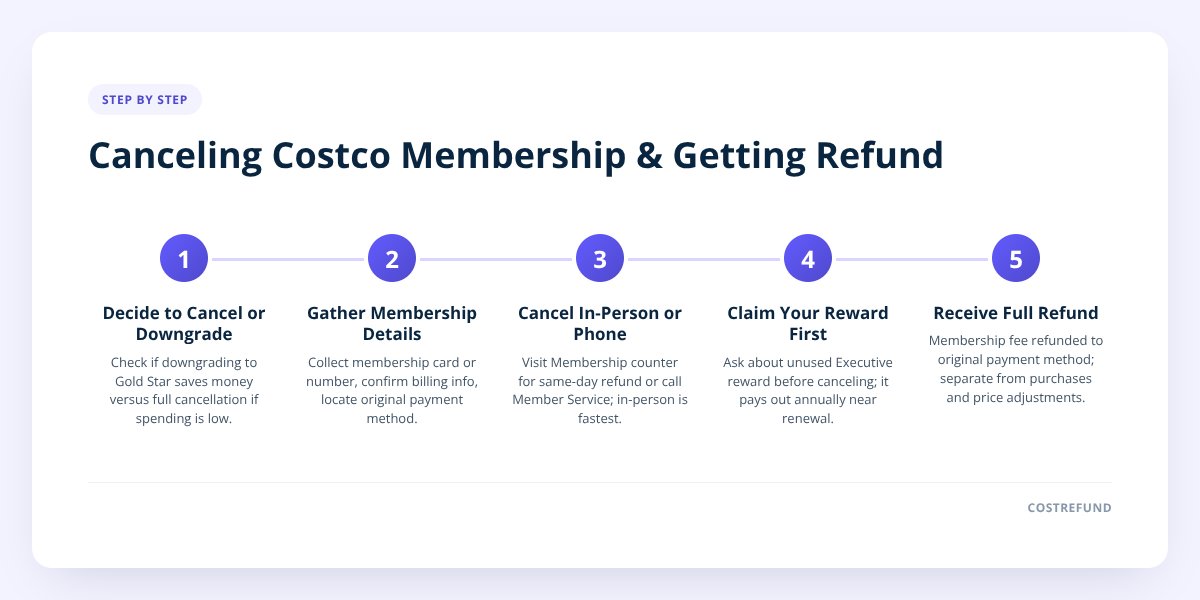
Step 1: Decide if you want to cancel or just downgrade
Before you walk away from your card, check whether downgrading solves the actual problem. If you paid for Executive Membership but rarely hit enough spending to earn back the extra cost in your 2% reward, you can drop to a standard Gold Star membership instead of canceling outright — Costco will refund the price difference between the two tiers.
A few reasons shoppers consider downgrading instead of canceling:
- You still want warehouse access and online ordering, just not the Executive tier's higher fee.
- You're not using the discounts on Costco services like the optical center, travel, or insurance.
- Your household spending dropped below the point where the 2% reward offsets the Executive fee.
- You want to pause spending for a season but plan to come back.
If none of that applies and you're done with Costco altogether, go ahead and cancel fully.
Step 2: Gather what you need before you go
Having the right information ready makes the counter visit faster. Costco Member Service can usually look you up without every item below, but bringing them avoids a second trip.
- Bring your Costco membership card, or know the membership number printed on it.
- Confirm the name and billing details match the account, especially if the card is a household or business membership.
- Locate your original payment method if you paid by card — refunds are typically issued back to it.
- Decide if you're canceling one card on a shared membership or the entire account.
- Note whether you have an Executive Membership reward balance that hasn't been paid out yet.
Step 3: Cancel in person, by phone, or by mail
In the US and Canada, Costco offers the same basic cancellation paths, but the details differ slightly by country.
| Method | United States | Canada |
|---|---|---|
| In-warehouse | Visit any Membership counter; refund processed same day | Visit any Membership counter; refund processed same day |
| Phone | Call Costco Member Service; refund mailed or credited | Call Costco Member Service Canada; refund mailed or credited |
| Not typically needed given in-store/phone options | Not typically needed given in-store/phone options | |
| Refund speed | Fastest in person; phone can take longer to post | Fastest in person; phone can take longer to post |
| Executive reward payout | Issued automatically near your renewal month if active | Issued automatically near your renewal month if active |
Don't skip this: if you have an unused Executive Membership reward sitting on your account, ask about it before you cancel. Costco pays that reward out once a year at renewal — canceling early may mean you walk away before it's issued, so confirm the timing with Member Service first.
In-person cancellation is the most reliable option because a staff member can check your account, confirm there's nothing outstanding, and process the refund while you're standing there. If you can't get to a warehouse, calling works too — just expect the refund to take a bit longer to show up, since it may be mailed as a check rather than credited instantly.
Step 4: Understand that your refund, your 2% reward, and a price adjustment are three different things
This is where a lot of confusion comes from, so it's worth separating clearly.
Your membership refund is Costco giving you back what you paid to be a member — the Gold Star or Executive fee. It has nothing to do with what you bought in the warehouse.
The 2% Executive reward is a once-a-year cashback payment, capped at an amount Costco sets annually, based on your qualifying purchases over the membership year. You only get it if you're an Executive Member, and it pays out around your renewal date regardless of whether you cancel afterward — it's not something you "claim" per item.
A price adjustment refund is different again. If you buy something at Costco and the price drops within the return window — commonly discussed as 30 days for most items — Costco will refund you the difference if you ask. This isn't automatic, it isn't a percentage of your spending, and it has nothing to do with your membership status. We cover the mechanics of this in how to get a Costco price adjustment on groceries and in Costco price adjustment on sale items, since eligibility rules shift depending on what you bought and whether it was already discounted.
None of these three stack or cancel each other out. Canceling your membership doesn't forfeit a price adjustment you're owed on a past purchase, and earning your 2% reward doesn't reduce what you can claim on an individual item's price drop. They're tracked and paid separately by Costco.
What if you cancel but you're still owed a price adjustment?
You can usually still request it, but the clock is the constraint, not your membership status. Price adjustments are tied to the purchase date on your receipt, not to whether your card is currently active. If you bought a TV three weeks ago and the price dropped yesterday, that adjustment is still yours to ask for — even if you cancel your membership tomorrow — as long as you're inside the window Costco allows for that category.
The catch is that once you've canceled, you may not be able to walk into a warehouse to request it as smoothly, since the Member Service counter typically looks up adjustments against an active account. If you're planning to cancel and you know a price drop might be coming on a recent purchase, it's worth requesting the adjustment first, then canceling. For items bought online, the process works a little differently — see Costco online price adjustment: how it works for the specifics.
This is also where tracking matters most, because remembering every purchase price and checking it against current pricing by hand doesn't scale once you've got more than a couple of receipts. CostRefund's receipt scanning watches your Costco purchases through the adjustment window and alerts you the moment an eligible item drops in price, so you're not relying on memory or manual price-checking before you cancel or before the window closes.
What to do next
If you're canceling for good, start with Step 1 above and decide whether a downgrade actually fits better. If you're keeping your membership but want to make sure you're not leaving price-adjustment money on the table before or after any account changes, create a free CostRefund account and upload your recent receipts — it'll flag anything still inside its window.
CostRefund tracks Costco purchases after you buy and tells you when you may be owed a price adjustment — it doesn't touch your membership fee or your Executive reward, but it makes sure the third kind of refund doesn't slip past you.
Checklist: canceling your Costco membership and getting your fee back
- Decide whether to downgrade to Gold Star or cancel fully.
- Check for an unpaid Executive Membership reward before you cancel.
- Gather your membership card or number and original payment details.
- Visit a Membership counter in person for the fastest refund, or call Member Service.
- Confirm whether any pending returns or price adjustments need to be settled first.
- Request any outstanding price adjustment before you cancel if the window is still open.
- Ask the counter to confirm the refund method and expected timing.
Related articles
Blog by Segeo — new article every day.
Keep reading
- Costco Alcohol Return Policy: Why It Depends on Your StateOctober 13, 20268 min read
- Does Executive Membership Change Costco Price Adjustments?September 3, 20268 min read
- Calling Costco Member Services for a RefundSeptember 3, 20268 min read
- 7 Reasons Costco Shoppers Miss Their 30-Day Refund WindowAugust 24, 20267 min read
- 7 Costco Refund Mistakes That Cost Shoppers Real MoneyJuly 30, 20268 min read
- 10 Items Most Likely to Get a Costco Price Drop Right After You Buy ThemJuly 26, 20268 min read
Start Saving on Costco Today
CostRefund automatically monitors price drops and helps you claim refunds. Create your free account and never leave money on the table again.
Start Saving





