

Costco Online Price Adjustment: How It Works

Quick answer: Costco.com honors price adjustments within 30 days of your order date, but the online process is stricter than in-warehouse — you request it through Costco Concierge Services (chat or phone) with your order number, not at a service desk, and several categories are excluded including Costco.com Marketplace items sold by third parties, clearance-tagged products, and most Instant Savings promotions once they expire. Keep your order confirmation email handy, since that's your real proof of purchase online, and submit your request as soon as you spot a lower price — Costco does not back-adjust after the 30-day window closes.
Key takeaways
- Costco.com's price adjustment window is 30 days from the order date, matching the in-warehouse policy, but online exclusions are broader and enforced more consistently.
- Marketplace items — anything sold by a third-party seller on Costco.com — are not eligible for Costco's price adjustment policy at all.
- Canadian members use Costco.ca's own customer service channel, and some promotional exclusions differ slightly from the US site, so confirm current terms on the site you ordered from.
- A membership number alone usually won't resolve an online claim — Costco customer service typically asks for the order number tied to the purchase.
Costco owes you money when prices drop
If something you bought gets cheaper within 30 days, you can claim the difference. CostRefund watches your receipts and tells you when you're owed.
Start freeHow Does Costco's Online Price Adjustment Differ From In-Store?
The core rule is the same — 30 days, one adjustment per item — but how you prove it and what qualifies is tighter online. We covered the in-warehouse side in detail in Costco Price Adjustment In-Store: What to Expect, and the contrast is worth knowing before you buy.
In a warehouse, a member service desk employee can usually look up your purchase using your membership number and reprint the receipt. Online, that shortcut mostly disappears. Costco.com purchases are tied to an order number, and that order number is what customer service needs to even find your transaction in their system.
| Costco.com (US) | In-Warehouse (US) | |
|---|---|---|
| Adjustment window | 30 days from order date | 30 days from purchase date |
| Where to request | Costco Concierge Services (chat/phone) | Membership/returns desk |
| Proof needed | Order number + confirmation email | Receipt or membership number |
| Marketplace items | Not eligible | N/A |
| Clearance items | Not eligible | Not eligible |
| Doorbuster/1-day deals | Generally not eligible | Generally not eligible |
The practical difference: in a warehouse, a friendly employee can often sort things out on the spot. Online, you're working through a support queue, and the agent is going to check your order against documented exclusion rules rather than make a judgment call. That means being organized before you reach out matters more for online claims.
How Do You Request an Online Price Adjustment, Step by Step?
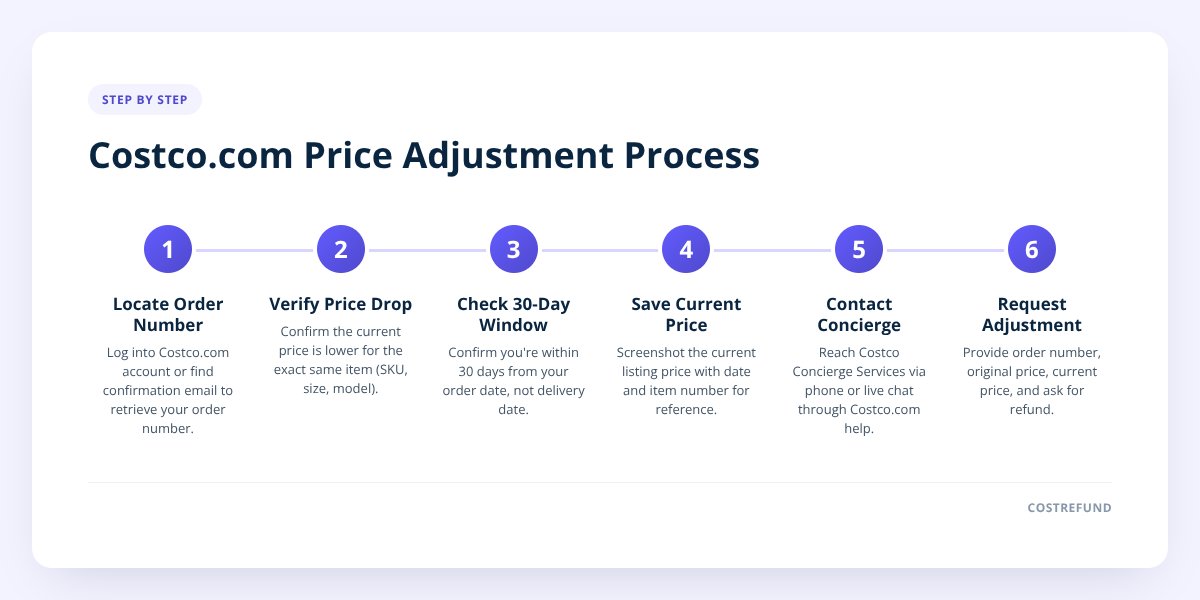
Here's the process Costco.com customers follow, start to finish:
-
Find your order number. Log into your Costco.com account and go to your order history, or dig up the confirmation email Costco sent when you placed the order. This number is non-negotiable — without it, Concierge Services generally can't locate your purchase.
-
Confirm the current price is actually lower. Check the exact same item — same size, color, pack count, and model number. A similar item on sale doesn't count; it has to be the identical SKU you bought.
-
Check that you're still inside the 30-day window. Costco counts from your order date, not your delivery date. If you ordered on September 15 and it shipped September 22, your clock started on the 15th.
-
Screenshot or save the current listing price. Having the live price visible (with date and item number) makes the conversation faster, even though the agent will verify it independently.
-
Contact Costco Concierge Services. This is Costco's customer service channel for Costco.com orders — available by phone or live chat through the Costco.com help section. This replaces the in-person service desk for online purchases.
-
State your order number and the price difference clearly. Tell the agent what you paid, what the item costs now, and ask for a price adjustment under Costco's published policy.
-
Ask for confirmation in writing. If approved, request an email confirming the refund amount and the credit timeline, so you have a record if the credit is delayed.
Don't skip this: Costco.com's 30-day window is enforced from the order date, and requests submitted even one day late are typically declined. If you're not tracking purchase dates somewhere, it's easy to let the window quietly close.
Because this window moves fast and there's no desk clerk reminding you, this is exactly the gap CostRefund's receipt tracking is built for — you upload a Costco receipt or order confirmation, and the app watches that item's price through the remaining days of its adjustment window and alerts you the moment it drops, so you're not relying on memory or a calendar reminder. Start tracking your purchases before the window closes on something you already bought.
What Items Don't Qualify for Online Price Adjustments?
Several categories are commonly excluded from Costco.com's price adjustment policy, and knowing them before you buy saves a frustrating support chat later.
- Marketplace items — Costco.com sells some products through third-party sellers under the "Costco Marketplace" banner; these are fulfilled and priced by the seller, not Costco, so Costco's price adjustment policy doesn't apply to them.
- Clearance and manager's special items — anything tagged as clearance or final-sale pricing online is generally excluded, the same as in warehouses.
- Limited-time doorbusters and one-day online deals — flash promotions tied to a specific date or hour typically don't trigger an adjustment once they expire, since the "sale" itself was the limited window.
- Expired Instant Savings and coupon-book promotions — if a discount came from a coupon book that has since rolled over to a new month, that savings period is closed.
- Some grocery and perishable items — fresh food, produce, and certain time-sensitive grocery categories are frequently excluded from adjustment policies across retailers, Costco included, because pricing changes too fast to track meaningfully.
We built a category-by-category breakdown of adjustment windows in Costco Price Adjustment Window by Category: The Full Chart, which is worth checking if you're unsure whether a specific item type qualifies. If you're wondering whether a sale-tagged item ever qualifies at all, Costco Price Adjustment on Sale Items: Does It Apply? walks through that specific case.
One category people ask about often: electronics. TVs, laptops, and appliances bought online are generally eligible for standard price adjustments as long as they're not Marketplace or clearance items — the exclusions are about the sales channel and promotion type, not the product category itself. If you're also weighing a return instead of an adjustment, our laptop return policy guide covers that separate 90-day return window, which works differently from the 30-day price adjustment clock.
Does Costco Canada's Online Price Adjustment Policy Work the Same Way?
Mostly yes, with a few differences worth confirming before you assume the US rules apply. Costco.ca runs its own version of the price adjustment policy, and members should check Costco.ca directly for the current terms rather than assuming the US and Canadian sites are identical.
- Currency and pricing — Costco.ca prices are in Canadian dollars, and adjustments are calculated and refunded in CAD, which matters if you're comparing prices across the border out of curiosity (you can't claim a US-dollar price drop against a Canadian purchase).
- Customer service channel — Canadian members use Costco.ca's own customer service contact rather than the US Concierge Services line, though the general phone/chat structure is similar.
- Promotional calendar differences — Instant Savings and coupon book timing don't always line up exactly between the US and Canada, so an item on sale in one country may not be discounted in the other at the same time.
- Marketplace and exclusions — the same general exclusion categories (Marketplace sellers, clearance, limited-time deals) apply on Costco.ca, though members should confirm current terms since policies can be updated.
We go deeper on this in Costco Price Adjustment Canada: How the Refund Really Works, including what Canadian members should have ready before contacting customer service.
What Counts as Proof of Purchase for an Online Claim?
Your order number and confirmation email are what actually get your claim processed — your membership number by itself usually isn't enough. This trips up a lot of shoppers who are used to the warehouse experience, where a membership number and a quick lookup at the desk is often sufficient.
Online, Costco's systems are built around order records, not membership records. An agent working an online claim needs to pull up the specific transaction, see the exact item, price paid, and date, and that record lives under your order number — not floating in a general membership purchase history the way some shoppers assume.
Before contacting Costco Concierge Services, gather:
- Your order confirmation email, or the order listed in your Costco.com account under order history.
- The order number itself, written down or ready to paste into chat.
- The exact item number or model number from your original order.
- A screenshot of the current (lower) price, including the date you saw it.
- The delivery or warehouse pickup date, in case the agent asks to distinguish it from the order date.
If you paid with a Costco Anywhere Visa or similar card, your card statement can sometimes supplement your claim, but it won't replace the order number as the primary reference.
What Should You Do Next?
Don't wait for a lower price to catch your eye by chance — 30 days goes by fast, especially on items you buy and then stop thinking about. CostRefund's receipt scanning reads your Costco purchases, tracks each eligible item through its adjustment window, and sends an alert the moment a tracked item's price drops, so you know with days still left on the clock rather than finding out after the window shuts.
The core process doesn't change: find your order number, confirm the price drop on the identical item, and contact Costco Concierge Services before day 30. Everything else is just staying organized long enough to catch the drop while it still counts.
Ready to stop manually checking prices on everything you've bought? Download the CostRefund app or create a free account and upload your last Costco order — it takes a couple of minutes to find out if something you already bought just got cheaper.
Checklist: Requesting a Costco.com Price Adjustment
- Log into Costco.com and locate the order number for your purchase.
- Confirm the item is the identical SKU, size, and model currently selling for less.
- Check the order date against today's date to confirm you're inside the 30-day window.
- Screenshot the current lower price with the date visible.
- Rule out exclusions — confirm the item isn't Marketplace, clearance, or a one-day deal.
- Contact Costco Concierge Services by phone or live chat with your order number ready.
- Request written confirmation of the approved adjustment and expected credit date.
- Upload the receipt to CostRefund so future price drops on the same order trigger an alert automatically.
Related articles
Blog by Segeo — new article every day.
Keep reading
- Costco Price Adjustment on Sale Items: Does It Apply?October 7, 20268 min read
- Costco Bundle Price Adjustment: What Refund You Can GetOctober 3, 20269 min read
- Costco Price Adjustment Processing Time: What to ExpectSeptember 27, 20267 min read
- Costco Food Return Policy: Groceries and PerishablesOctober 12, 20268 min read
- Costco TV Return Policy: Windows and Refund TipsSeptember 28, 20268 min read
- Costco Mattress Return Policy: What to KnowSeptember 24, 20268 min read
Start Saving on Costco Today
CostRefund automatically monitors price drops and helps you claim refunds. Create your free account and never leave money on the table again.
Start Saving





