

Costco Price Adjustment on Sale Items: Does It Apply?

Quick answer: Yes — Costco's price adjustment policy applies even if the item was already on sale or part of a promotion when you bought it. What matters is the price you paid versus the current selling price within the adjustment window, not whether a discount was involved at the time of purchase. If a sale item drops further, or if a new promotion brings the price below what you paid, you can still ask for the difference.
Key takeaways
- Costco's price adjustment policy covers any price drop within the eligible window, whether the item was full price or already discounted at purchase.
- The adjustment window is generally 30 days from the purchase date, though it does not apply to every category — check the item type before assuming you qualify.
- Clearance items marked with a star or asterisk on the price tag are typically final-sale and usually excluded from further adjustments.
- Costco Canada and Costco US both offer price adjustments, but the process for requesting one differs slightly between the two countries.
Does a Sale Price Still Qualify for a Price Adjustment?
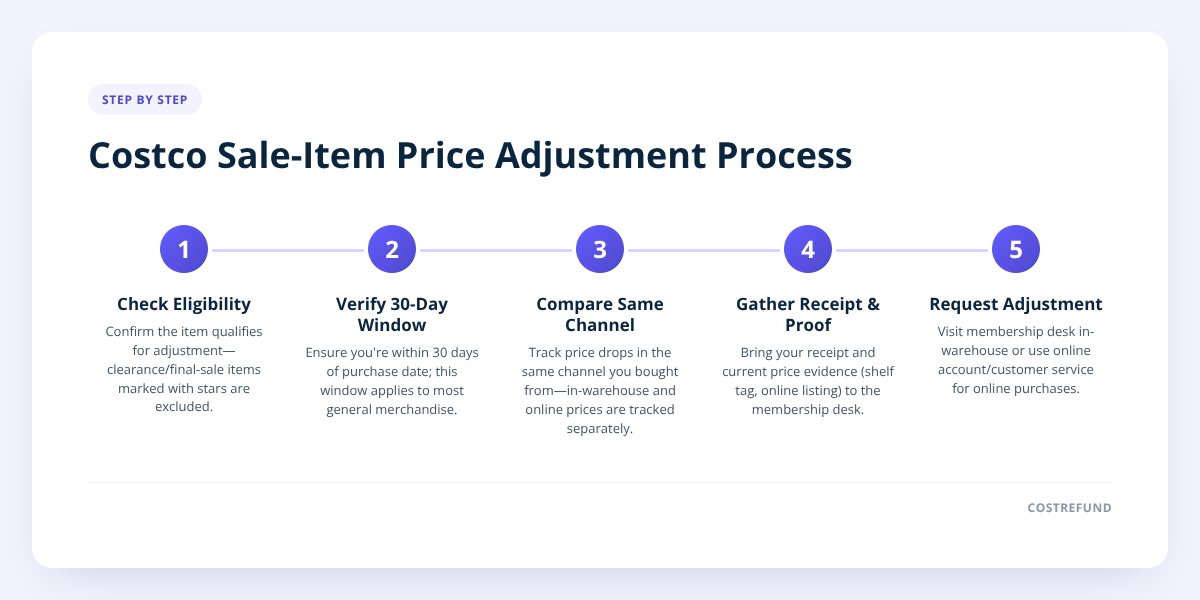
Yes. Costco doesn't treat a sale-priced item differently from a full-price one when it comes to adjustments. The policy is based on a simple comparison: what you paid versus what the item costs now. If that number drops during the eligible window, the gap is refundable — regardless of whether you bought it at full price, during a warehouse promotion, or through an online deal.
Here's a worked example. Say you buy a stand mixer for $279.99 during a two-week promotional sale. A week later, Costco drops the price further to $249.99 as part of a different promotion, or simply because the sale extends. You paid $279.99 — the current price is $249.99 — so you're owed the $30 difference, assuming you're still inside the adjustment window.
The confusion usually comes from people assuming "already on sale" means "already at the lowest possible price Costco will offer." That's not how it works. Sales stack, overlap, and sometimes get extended or deepened without much notice. Your purchase price is locked in on the day you bought it, and Costco compares it against whatever the shelf or online price is later — sale or not.
What's the Actual Adjustment Window?
Costco's standard adjustment period is 30 days from your purchase date, based on Costco's published return and price adjustment policy. That clock starts the day you buy the item, not the day the sale started or ended. If you bought something on day one of a two-week sale and the price dropped again on day 25, you're still inside the window and still eligible to ask.
A few things to keep in mind about timing:
- The 30-day window applies to most general merchandise, electronics, and seasonal goods.
- Some categories have different rules entirely — Costco's published policy excludes certain items from price adjustments altogether, so don't assume everything qualifies.
- Online purchases and in-warehouse purchases are tracked separately, and the process for requesting each differs.
- Tires often follow their own adjustment terms tied to Costco's tire center program rather than the general merchandise policy.
We go deeper into the exact mechanics of the adjustment window in Costco's price adjustment policy, including what counts as a qualifying price drop versus a different promotion entirely.
Don't skip this: Clearance items marked with a star, asterisk, or "manager's special" sticker are usually final-sale and excluded from price adjustments, even if the price drops again later. Always check the tag before assuming a markdown item is covered.
Does It Matter Whether the Sale Was In-Store or Online?
It can — Costco tracks in-warehouse and online pricing separately, and a drop on one doesn't automatically apply to the other. If you bought an item in the warehouse and it later drops in price online, that's generally treated as a different price point, not an automatic match. The reverse is also true.
This trips people up constantly during big promotional periods like the lead-up to Black Friday or seasonal clearance events, when online and in-store pricing can diverge for the same item. The safest approach is to track the specific channel you bought from and compare against that same channel's current price.
For online purchases specifically, Costco has a documented process for requesting the adjustment through your account rather than visiting a warehouse. We cover that process step by step in Costco's online price adjustment form.
Costco US vs. Costco Canada: Does the Sale-Item Rule Differ?
The core rule — that sale items still qualify for further adjustments — is the same in both countries, but the request process is not identical. Here's the side-by-side:
| Costco US | Costco Canada | |
|---|---|---|
| Sale items eligible for further adjustment | Yes | Yes |
| Standard adjustment window | 30 days from purchase | 30 days from purchase |
| In-warehouse request method | Membership desk, receipt required | Membership desk, receipt required |
| Online request method | Online account/customer service | Online account/customer service |
| Clearance/final-sale exclusions | Yes, marked items excluded | Yes, marked items excluded |
If you shop at both US and Canadian warehouses — common for people near the border — don't assume a rule confirmed at one location automatically applies at the other. We've broken down the country-specific details in Costco Price Adjustment Canada: How the Refund Really Works, including what documentation Canadian members typically need to bring.
What If the "Sale" Was Actually a Coupon Book Discount?
This is where it gets a little more nuanced. Costco's coupon book promotions are time-limited instant savings, and the published discount usually applies automatically at checkout rather than as a separate adjustable price. If you bought an item during a coupon book period and the book's discount expires, that's not generally treated the same as a standalone price drop — the coupon book price was a temporary offer, not necessarily the new shelf price.
Where it does matter: if the regular shelf price itself drops after the coupon book period ends — independent of the coupon — that's a standard price adjustment situation. The distinction is whether the lower price you're comparing against is a genuine new price, or just the expiration of a temporary instant-savings event.
If you're not sure whether a specific markdown was a coupon book event or a true price drop, check the Costco coupon book for the current cycle's offers before assuming eligibility either way.
How Do You Actually Track a Sale Item Through the Window?
Manually, you'd need to save every receipt, write down the purchase date, and go back to check prices periodically for 30 days on every single thing you bought — which nobody actually does. That's precisely the gap CostRefund was built to close.
Here's the practical issue: a sale item that drops further often does so quietly, mid-promotion, with no announcement. You're not going to remember to check the price on a mixer you bought three weeks ago. By the time you notice, the window may have already closed.
CostRefund's receipt scanning reads your Costco receipt, flags eligible items, and monitors them for the rest of your 30-day window. When a price drops — sale item or not — you get an alert with the purchase price, the current price, and how many days you have left to act. You still have to go ask Costco; the app just makes sure you know in time to do it.
A quick checklist for sale-item purchases specifically:
- Save the receipt (paper or digital) the day you buy, noting the purchase date clearly.
- Check the price tag for a star, asterisk, or clearance marking before assuming it's adjustable.
- Note which channel you bought from — in-warehouse or online — since the two are tracked separately.
- Set a reminder for day 25 to check current pricing if you're tracking manually.
- Bring your receipt and membership card to the desk, or use your online account for web purchases.
If you'd rather not run that checklist by hand every time, create a free CostRefund account and upload your receipt — the app handles the monitoring and tells you the moment a tracked item qualifies.
Costco decides what actually gets approved at the membership desk or through customer service — CostRefund's job is just making sure a sale-priced purchase doesn't quietly slip past you before the window closes. Get the app on iPhone or Android and let it watch your receipts for you.
Checklist: Claiming a Price Adjustment on a Sale Item
- Confirm the item isn't marked with a star, asterisk, or "manager's special" clearance tag.
- Check whether you're still within 30 days of your purchase date.
- Compare the current price in the same channel you bought from — warehouse or online.
- Determine whether the lower price is a true markdown, not just a coupon book discount expiring.
- Pull up your original receipt showing the purchase price and date.
- Visit the membership desk with your receipt and card, or start the request through your online account.
- Upload the receipt to CostRefund so future drops on the same item trigger an alert automatically.
Related articles
Blog by Segeo — new article every day.
Keep reading
- Costco Laptop Return Policy: 90-Day Rule for LaptopsOctober 6, 20268 min read
- Costco Price Adjustment In-Store: What to ExpectSeptember 25, 20268 min read
- Costco Price Adjustment: The Complete 2026 GuideSeptember 22, 20265 min read
- Costco Price Calculator: Estimate Your RefundSeptember 23, 20267 min read
- Costco TV Return Policy: Windows and Refund TipsSeptember 28, 20268 min read
- Costco Mattress Return Policy: What to KnowSeptember 24, 20268 min read
Start Saving on Costco Today
CostRefund automatically monitors price drops and helps you claim refunds. Create your free account and never leave money on the table again.
Start Saving





