
Costco Laptop Return Policy: 90-Day Rule for Laptops

Quick answer: Costco gives you 90 days to return a laptop or tablet from the date of purchase, following the same rule it applies to TVs, cameras, and other major electronics, according to Costco's publicly posted return policy. That's shorter than Costco's general "risk-free 100% satisfaction guarantee" with no time limit on most merchandise, but longer than what most electronics retailers offer. Before you return or exchange a laptop, back up your files, sign out of your accounts, and wipe the drive — Costco can't do that for you, and a factory reset is often required before the return is processed.
Key takeaways
- Laptops and tablets fall under Costco's 90-day major electronics return window, not the unlimited window that covers most other products.
- The 90 days start on your purchase date, so check your receipt before assuming you still have time.
- You should deauthorize software licenses, sign out of cloud accounts, and back up your data before returning any laptop — Costco's return counter won't do this for you.
- If the price drops on a laptop you already bought and kept, you may qualify for a price adjustment within Costco's 30-day adjustment window, which is separate from the 90-day return rule.
Step 1: Confirm your laptop is actually covered by the 90-day window
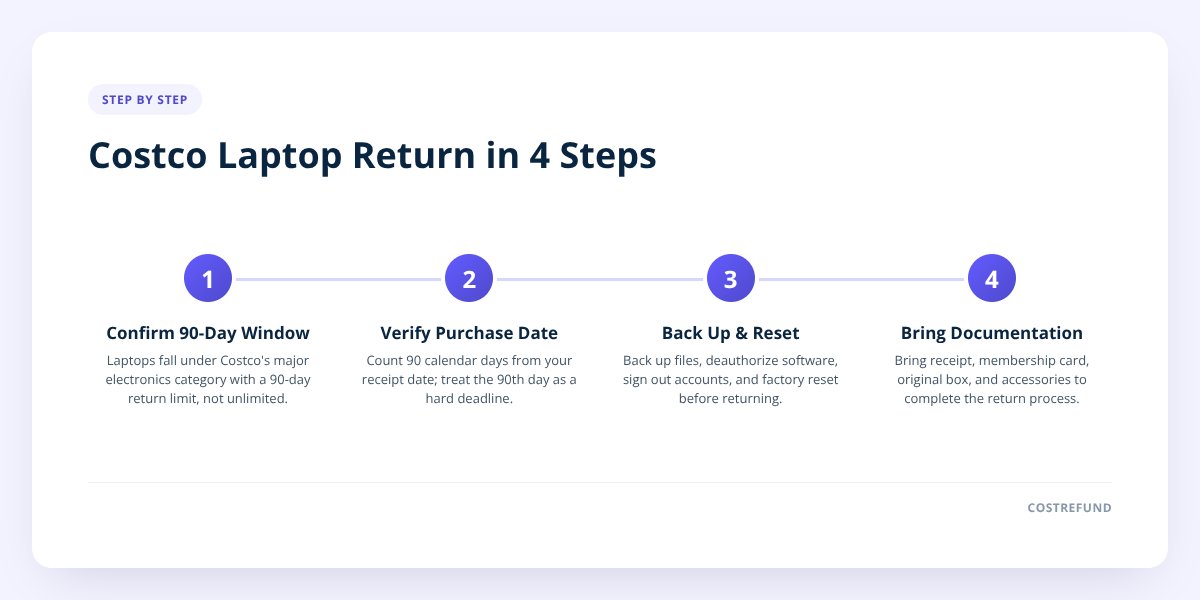
Yes — laptops and tablets are classified as major electronics at Costco, which means they fall under the 90-day return window rather than Costco's standard no-deadline return policy. Costco's general return policy, as published on its website, offers a "risk-free 100% satisfaction guarantee" on most merchandise with no stated time limit. But Costco carves out exceptions for a specific list of electronics, and laptops sit squarely on that list alongside TVs, projectors, cameras, drones, and smartwatches.
This distinction trips people up because Costco's return culture is famous for being generous. Members return furniture years later, return worn-out shoes, return half-eaten bags of nuts. So it's easy to assume a laptop works the same way. It doesn't.
- Covered under 90-day rule: laptops, tablets, desktop computers, TVs, projectors, cameras, camcorders, drones, smartwatches, and most other electronics.
- Covered under standard unlimited window: most non-electronics merchandise, with Costco's usual satisfaction guarantee applying.
- Separate rules entirely: diamonds over a certain size (satisfaction guarantee doesn't apply the same way), custom items, and a handful of other categories.
We go deeper on how this 90-day rule works across the whole electronics category in Costco Electronics Return Policy: The 90-Day Rule Explained, which is worth a read if you're also holding onto a TV or camera purchase.
Step 2: Find your purchase date and count forward
Your 90 days start on the date printed on your Costco receipt, not the date you open the box or start using the laptop. This matters because laptops often sit in a closet for a few weeks before someone sets them up — a common gift scenario, or a backup machine bought "just in case."
Pull up your receipt or check your Costco.com order history if you bought it online. Count 90 calendar days forward from that date. If you're close to the edge, don't wait — bring it back a few days early rather than risk missing the cutoff by a day or two.
Don't skip this: once you're past 90 days, Costco's major electronics window closes and the laptop is no longer eligible for return, regardless of its condition. There's no published grace period, so treat the 90th day as a hard deadline, not a suggestion.
Step 3: Back up everything before you bring it back
This is the step people skip, and it's the one that causes real pain. Once you hand a laptop over for a return or exchange, you generally don't get a second chance at the data on that drive.
Before you head to the warehouse, work through this checklist:
- Back up your files to an external drive, a cloud service, or both — don't rely on a single copy.
- Export your browser bookmarks, saved passwords, and any local email data you want to keep.
- Sign out of iCloud, Google, Microsoft, and any other account tied to the device.
- Deauthorize software licenses (Adobe, Microsoft Office, antivirus subscriptions) so you can reactivate them on your next machine.
- Remove any SIM card, SD card, or external storage you inserted.
- Unpair Bluetooth devices and remove the laptop from "trusted devices" lists on your accounts.
- Run a factory reset or full wipe so your personal data isn't sitting on a machine headed back to Costco's return stream.
- Repack the original box, power cord, manuals, and any bundled accessories — missing parts can slow down or complicate a return.
A factory reset isn't just good hygiene — it's frequently required before the return can go through, since Costco needs to confirm the device isn't locked to your account (this matters especially for Apple devices with Activation Lock or Chromebooks tied to a Google account).
Step 4: Bring the right documentation to the warehouse
You'll move faster through the returns desk if you show up prepared, even though Costco can often look up your purchase using your membership number alone. Bring your receipt if you have it, your membership card, and the original packaging with all accessories.
If you bought the laptop online through Costco.com, the return process may route through mail-in return labels instead of (or in addition to) an in-warehouse return — check your order confirmation email or Costco.com account for the specific instructions tied to that order. Policies and available return methods can vary by how and where you bought the item, so confirm the current process with Costco directly if anything in your order history looks different from what's described here.
If you've lost your receipt entirely, Costco can often still process a return using your membership purchase history, but there are limits and exceptions worth understanding — we cover that in Costco Return Policy Without a Receipt: How It Works.
What if the laptop just dropped in price instead of breaking?
That's a price adjustment situation, not a return, and it works on a completely different and shorter timeline. Costco's price adjustment window is typically 30 days from your purchase date — meaning if the laptop you bought drops in price within that window, you may be able to get the difference refunded rather than returning the whole machine.
| Situation | Window | What happens |
|---|---|---|
| Laptop is defective, unwanted, or you changed your mind | 90 days | Return or exchange under the major electronics policy |
| Laptop price drops after you bought it, device works fine | ~30 days | Request a price adjustment for the difference |
| You lost the receipt | No receipt | Costco may use membership purchase history, with limits |
The 30-day price adjustment window is easy to let slip by, especially with October deal season bringing laptop and gaming PC markdowns across Costco's electronics lineup. If you bought a laptop a few weeks ago and suspect it's now cheaper, that's exactly the kind of gap CostRefund's receipt scanning is built to catch — upload the receipt, and the app tracks the purchase price against the current price for the length of the adjustment window, alerting you the moment there's a gap worth asking about. For the full mechanics of how adjustment requests work, see Costco Price Adjustment on Electronics and Appliances.
US vs. Canada: does the laptop return window differ?
Costco's 90-day major electronics window applies in both the US and Canada, but always confirm specifics with your local Costco since membership terms and posted signage can carry minor regional notes. The core structure — standard satisfaction guarantee for most goods, 90-day window carved out for electronics including laptops and tablets — is consistent across both countries based on Costco's published policies.
Where things can differ more noticeably between the two countries is the price adjustment window length and how online returns are handled, since Costco.com and Costco.ca run as separate systems with their own order histories and shipping processes. If you're a Canadian member, it's worth checking your own receipt and local warehouse signage rather than assuming a US policy detail carries over exactly.
What to do next
If your laptop is within 90 days and something's wrong with it, don't wait — bring your receipt, wipe the drive, and head to the returns desk. If it's working fine but you're wondering whether you paid too much, that's a different clock entirely, and it's the one most people forget to watch.
CostRefund tracks that second clock for you. Scan your Costco receipt into the app, and it watches your laptop's price for the length of the adjustment window, showing you the original price, the current price, and the days left to act — so you're not manually rechecking Costco's website every few days. Start tracking your receipts or grab the app to see what else in your cart might already be eligible for money back.
Checklist: Returning a laptop within Costco's 90-day window
- Check your receipt date and confirm you're inside the 90-day window.
- Back up all files to an external drive or cloud storage.
- Sign out of iCloud, Google, Microsoft, and any linked accounts.
- Deauthorize software licenses tied to the machine.
- Remove SIM cards, SD cards, and any inserted external storage.
- Run a full factory reset to erase your personal data.
- Repack the original box, cables, charger, and manuals.
- Bring your membership card and receipt (or order confirmation if bought online).
- Confirm whether your purchase requires an in-warehouse return or a mail-in label.
Related articles
Blog by Segeo — new article every day.
Keep reading
- Walmart Price Adjustment vs Costco: What's the Difference?October 5, 20268 min read
- Costco Bulk Purchases: How Price Adjustments Really WorkSeptember 22, 20269 min read
- Costco Price Adjustment: The Complete 2026 GuideSeptember 22, 20265 min read
- Costco Electronics Return Policy: The 90-Day Rule ExplainedSeptember 26, 20268 min read
- Costco Furniture Return Policy: Large Items and DeliveryOctober 4, 20268 min read
- Costco Jewelry Return Policy: What Members Should KnowOctober 2, 20268 min read
Start Saving on Costco Today
CostRefund automatically monitors price drops and helps you claim refunds. Create your free account and never leave money on the table again.
Start Saving





