

Costco TV Return Policy: Windows and Refund Tips

Quick answer: Costco gives you 90 days to return a TV, not the standard 180-day window for most other merchandise. This shorter clock applies because Costco classifies TVs as major electronics, a category that also covers computers, projectors, drones, and select wearables. You can return a TV with or without a receipt in most cases, but Costco can look up your purchase using your membership number, so keep that handy either way.
Key takeaways
- Costco's return window for TVs is 90 days from the purchase date, according to Costco's published Electronics Return Policy — shorter than the 180 days allowed for most general merchandise.
- The 90-day clock covers major electronics broadly: TVs, computers, tablets, cameras, drones, projectors, and certain smartwatches fall under the same rule.
- Costco Canada follows the same 90-day electronics window as Costco US; the difference between the two countries shows up more in coupon books and price adjustment mechanics than in return timing.
- A TV can still qualify for a price adjustment within 30 days of purchase even after the return window logic doesn't apply — that's a separate Costco policy worth tracking.
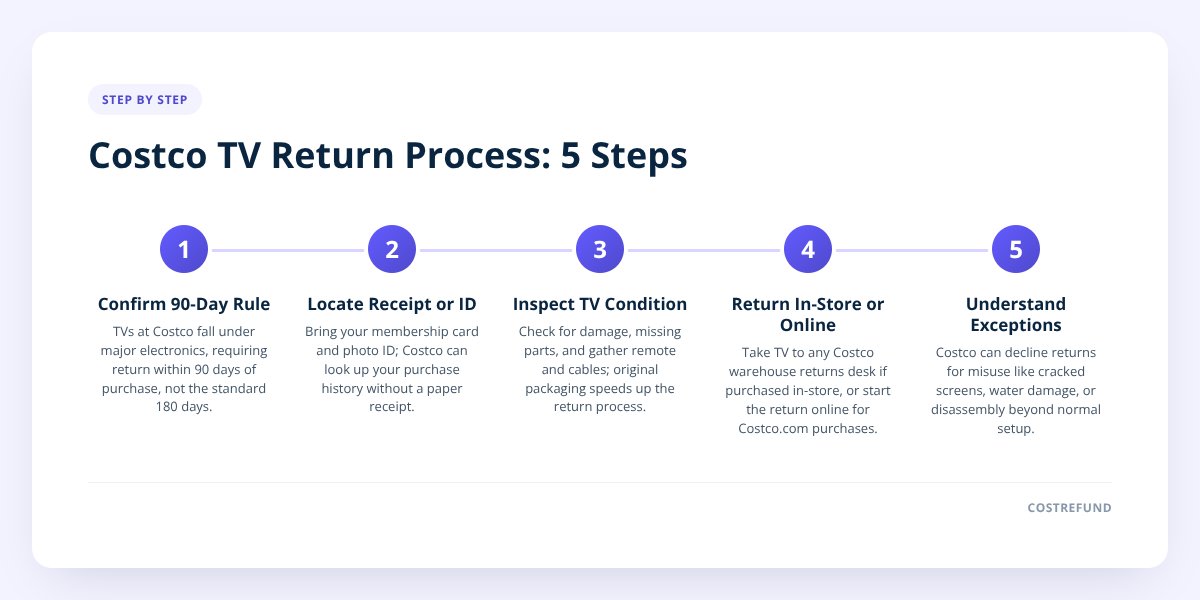
Step 1: Confirm your TV falls under the 90-day electronics rule
Almost every TV sold at Costco is treated as major electronics, which means the 90-day return window applies rather than the general 180-day window. This is one of the few categories where Costco tightens its otherwise famously generous return policy.
Costco's published return policy carves out exceptions for a handful of product types, and electronics is the biggest one. We covered the full list of what falls under this rule in Costco Electronics Return Policy: The 90-Day Rule Explained, but here's the short version for TVs specifically:
- Standard flat-screen TVs — 90 days from purchase, no exceptions for size or price.
- Projectors used as home theater displays — treated the same as TVs, 90 days.
- Smart TV accessories bought separately (streaming sticks, soundbars) — often follow the general 180-day rule unless bundled with the TV purchase, so check your receipt.
Don't skip this: the 90-day clock starts on the purchase date printed on your receipt, not the delivery date. If a TV shipped two weeks after you ordered it, those two weeks still count against your return window.
Step 2: Find your receipt — or use your membership number if you can't
You don't strictly need a paper receipt to return a TV at Costco, because your membership account keeps a digital purchase history the warehouse can pull up. If you're returning without a receipt, bring your membership card and a photo ID, and be ready for the staff to verify the purchase date against that 90-day window before they process anything.
Costco's return-without-receipt process works the same way for TVs as it does for most other items, but the stricter 90-day cutoff still applies once your purchase date is confirmed. We go deeper into how that lookup works in Costco Electronics Return Policy: The 90-Day Rule Explained.
If you bought the TV online, log into your Costco.com account instead — your order history there works the same way a paper receipt would for an in-warehouse purchase.
Step 3: Check the TV for damage, missing parts, and packaging before you go
Costco doesn't require original packaging for most returns, but showing up with the box, remote, cables, and stand makes the process faster and avoids any question about condition. Missing accessories won't usually block a return outright, but a damaged screen or a TV that's clearly been mishandled can complicate things at the returns desk.
Before you head to the warehouse, walk through this:
- Locate the remote control and original cables that came in the box.
- Check the screen for cracks, dead pixels, or burn-in that wasn't there at purchase.
- Repack the TV in its original box if you still have it — this isn't mandatory, but it speeds up the desk interaction.
- Bring your membership card and the receipt or order confirmation.
- Note the exact purchase date so you know where you stand in the 90-day window.
Step 4: Return in-store or start the process online, depending on where you bought it
Take the TV to any Costco warehouse returns desk if you bought it in a warehouse — location doesn't matter, you don't have to go back to the exact store where you purchased it. If you bought it through Costco.com, you can typically start the return online, though large items like TVs are sometimes routed to a specific return method (in-store drop-off vs. a scheduled pickup) depending on size and shipping carrier.
| Purchase method | Where to return | What to bring |
|---|---|---|
| In-warehouse (US or Canada) | Any Costco warehouse | Membership card, receipt (or ID for lookup) |
| Costco.com | Start online, or bring to warehouse | Order confirmation, membership number |
| Costco.ca | Start online, or bring to warehouse | Order confirmation, membership number |
Refunds for card purchases typically go back to the original payment method; cash purchases are usually refunded in cash or by check depending on the amount. Costco's front-line staff can confirm the exact method for your specific order.
Step 5: Know what Costco won't take back, even inside 90 days
Costco can decline a TV return if there's clear evidence of misuse, such as a cracked screen from a drop, water damage, or a unit that's been disassembled beyond normal setup. The 90-day window is a maximum, not a guarantee — Costco's returns staff make the final call on condition-based exceptions, and that discretion is documented as part of their standard process.
A few situations worth knowing about before you're standing at the counter:
- Commercial or bulk purchases may be subject to different terms if bought under a business account.
- Open-box or clearance TVs still generally fall under the same 90-day rule unless the listing said otherwise at purchase.
- TVs bought as part of a bundle (TV plus wall mount, TV plus soundbar) should be returned together when possible to avoid confusion about what price applies to the standalone item.
US vs. Canada: what's actually different
The 90-day electronics return window is the same on both sides of the border — the real differences between Costco US and Costco Canada show up in coupon timing and how price adjustments are processed, not in how long you have to return a TV. If you're comparing the two markets for other reasons, Costco Canada vs US Coupon Books: Key Differences breaks down where the countries genuinely diverge.
One thing that trips people up: Costco Canada and Costco US run separate membership systems, so a receipt from a US warehouse won't show up in a lookup at a Canadian location, and vice versa. If you're cross-border shopping, hang onto the physical receipt as backup.
Don't forget the 30-day price adjustment window
Even if you're happy with your TV and have no plans to return it, Costco's price adjustment policy gives you 30 days from purchase to claim the difference if the price drops. This is a completely separate rule from the 90-day return window — one is about sending the item back, the other is about keeping the TV and getting cash back if it goes on sale.
We've covered how this specifically applies to TVs and other electronics in Costco Price Adjustment on Electronics and Appliances, and the general adjustment mechanics in Costco Price Adjustment: How It Works. If you're in Canada, the process has a few of its own wrinkles covered in Costco Price Adjustment Canada: How the Refund Really Works.
This is exactly the gap CostRefund fills. You upload your receipt, and the app tracks that TV for price drops during the eligible window, alerting you the moment it might qualify for money back. CostRefund flags the opportunity — Costco still makes the final call on approval — but you're not stuck checking prices manually every few days for a month.
Ready to see what you might be owed? Head to CostRefund, scan your last Costco receipt, and let it watch for price drops on your TV and everything else in your last 30 days of purchases.
Checklist: Returning a TV to Costco
- Confirm your purchase date and count forward 90 days to see if you're still eligible.
- Locate your receipt, or your membership card if you don't have one.
- Gather the remote, cables, stand, and original box if you still have them.
- Inspect the screen and body for damage not caused by a defect.
- Bring a photo ID along with your membership card to the returns desk.
- Ask which refund method applies if you paid by cash or check.
- Scan the receipt into CostRefund before you decide whether to keep or return it, in case a price drop makes keeping it the better deal.
Related articles
Blog by Segeo — new article every day.
Keep reading
- Costco vs Sam's Club: Price Adjustment ComparedSeptember 29, 20269 min read
- Costco Price Adjustment Processing Time: What to ExpectSeptember 27, 20267 min read
- Calling Costco Member Services for a RefundSeptember 3, 20268 min read
- 7 Reasons Costco Shoppers Miss Their 30-Day Refund WindowAugust 24, 20267 min read
- 7 Costco Refund Mistakes That Cost Shoppers Real MoneyJuly 30, 20268 min read
- Costco Bulk Purchases: How Price Adjustments Really WorkSeptember 22, 20269 min read
Start Saving on Costco Today
CostRefund automatically monitors price drops and helps you claim refunds. Create your free account and never leave money on the table again.
Start Saving





