
How Receipt-Scanning Apps Catch Costco Price Drops

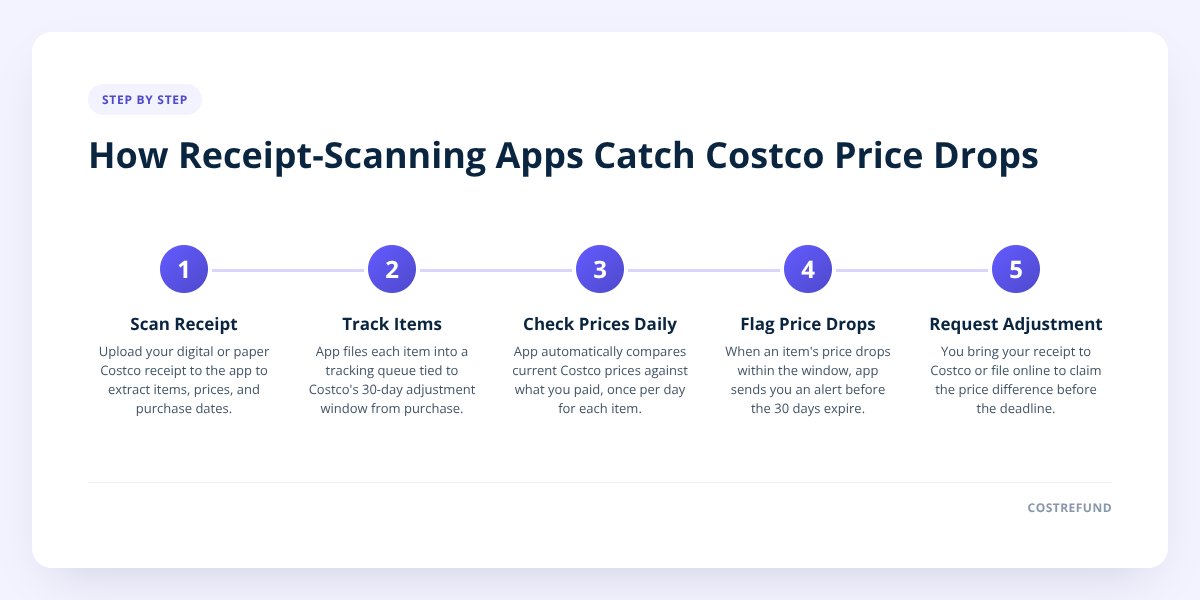
Quick answer: A receipt-scanning app catches Costco price drops by reading the items off your digital receipt, then quietly checking those same items against current prices every day while your 30-day adjustment window is open. When Costco publishes the Costco fee schedule — no, when the price on your item drops, the app flags it and tells you before the window closes. Without one, you'd have to remember every purchase and manually recheck prices yourself, which almost nobody does consistently.
Key takeaways
- Costco gives members a 30-day window from the purchase date to request a price adjustment if an item's price drops, according to Costco's publicly posted policy.
- A receipt-scanning app automates the two hardest parts of that process: remembering what you bought, and checking it against the current price every single day.
- Costco does not proactively notify members of eligible price drops — the burden is on the shopper to catch it and ask, which is the entire reason this app category exists.
- CostRefund's receipt scanning tracks eligible purchases through the adjustment window and sends an alert the moment a tracked item's price drops, so there's still time to act.
Costco owes you money when prices drop
If something you bought gets cheaper within 30 days, you can claim the difference. CostRefund watches your receipts and tells you when you're owed.
Start freeWhat does a receipt-scanning app actually do?
It turns a paper or digital Costco receipt into a list of trackable items, then watches each one for a price change. You scan or upload the receipt, the app reads the line items — product name, price paid, date of purchase — and files each one into a tracking queue tied to Costco's 30-day adjustment window.
From there, the app checks current prices against what you paid, usually once a day, for every item still inside its window. That's the part a person realistically can't do by hand. Tracking five receipts across a month means checking maybe 40 to 60 individual prices, every day, until each window closes — and remembering which items have already expired out of eligibility.
This is a fundamentally different job than a browser price-tracking extension, which watches a product page you bookmark. A Costco receipt tracker works backward from what you already bought, which matters because Costco's price adjustment policy is purchase-triggered, not wish-list-triggered. You don't need to know a price might drop — you need something checking after the fact, automatically.
Why do people miss price drops without one?
Because Costco's price adjustment policy puts the responsibility entirely on the shopper, with no automatic notification. Costco does not email you or flag your account when something you bought goes on sale — you have to notice, and then bring your receipt to request the adjustment yourself, per the policy posted on Costco's own site.
Here's where that breaks down in real life:
- The window is short. Thirty days sounds generous until you're three weeks into a busy month and haven't thought about that air purifier since you bought it.
- Costco's price changes aren't announced to shoppers. A televison that drops $80 on a Tuesday doesn't trigger any alert — you'd only know by walking past it in the warehouse or happening to check the online listing.
- People buy a lot at Costco, in one trip. A single warehouse run might include 15 to 20 items, each with its own 30-day clock. Keeping all of them straight in your head isn't realistic.
- Receipts get lost. Costco does keep purchase history tied to your membership, but digging through it item by item, repeatedly, is tedious enough that most people stop after the first try.
Add it up, and the structural issue is this: the policy rewards vigilance, but gives you no tool to be vigilant with unless you build one yourself or use an app that does it for you.
How is this different from manually checking prices yourself?
Manually checking means you decide what to track, remember to check it, and do the comparison — every day, for every item, until the window closes. An app does all three of those automatically, and does them for every item on every receipt you upload, not just the handful you remember to care about.
Consider a real-shaped example. Say you buy a $600 air fryer combo unit, a $45 case of wine, and a $220 pair of tires in the same trip. Doing this manually, you'd need to:
- Write down (or remember) the purchase date and price for all three.
- Set yourself a reminder to check back, ideally more than once, over the next 30 days.
- Actually go check — online for the appliance, in-warehouse or online for the wine, and separately for the tires, since Costco tires price adjustment requests sometimes involve a different process at the Tire Center.
- Catch the drop before day 30, then bring your receipt in or file online to ask.
Most people do this for maybe one item, if any, because it's tedious across three. A scanning app does it for all three the moment you upload the receipt, with no further effort from you — and it does the same for every other receipt you've ever uploaded, in parallel, for as long as each window stays open.
Don't skip this: Costco's price adjustment window closes 30 days after purchase, according to Costco's own policy — a drop spotted on day 31 is a drop you can no longer act on, no matter how clear the markdown is.
Does this work the same way for Costco Canada?
Mostly, but with timing differences worth knowing about. Costco Canada operates its own price adjustment window and in-store process, and it can differ from the US policy in small but real ways — always confirm the current window length and any category exclusions directly with Costco Canada, since published specifics can shift.
A receipt-scanning app built for both markets, like CostRefund, needs to know which country's receipt it's reading and apply that country's rules — not just run every receipt through a single US-shaped template. That distinction matters more than it sounds: a tool that silently applies US timing to a Canadian purchase could tell you a window is still open when it isn't, or vice versa.
If you shop at both Costco US and Costco Canada — a border-area shopper, for instance — this is worth checking directly with whatever app you use, rather than assuming it handles both the same way.
What's the difference between a price tracker and a price-drop alert?
A price tracker is the ongoing record — the thing watching the countdown and showing you the gap between what you paid and what the item costs now. An alert is the notification that fires the moment that gap appears, which is the part that actually gets you to act before the window closes.
| Feature | What it does | Why it matters |
|---|---|---|
| Receipt scanning | Reads items off your receipt automatically | Removes manual entry of every purchase |
| Price tracker | Shows purchase price vs. current price, days left in window | Lets you see at a glance what's worth acting on |
| Price-drop alert | Notifies you the moment a tracked item's price falls | Means you don't have to remember to check |
| Deals feed | Surfaces current markdowns across the warehouse | Useful for future purchases, not past ones |
The tracker alone is useful — you could check it manually once a week. But the alert is what closes the gap between "this dropped" and "I noticed in time." We go deeper on the mechanics of this in our Costco price adjustment tracker breakdown, and if you're comparing tools in this category generally, how to choose the right tracker walks through what actually separates them.
For the adjustment rules themselves — what qualifies, what doesn't, how long you have — our Costco price adjustment guide covers the policy in full, and our standalone Costco price tracker pillar page is the best starting point if you want the category explained from scratch.
What should I look for before I pick one of these apps?
Four things matter more than flashy features: accurate item reading, daily price checks, timely alerts, and what the app does with your data. A tool that scans receipts well but checks prices weekly, or alerts you two days before expiry instead of twenty-eight, isn't solving the actual problem.
- Confirm it reads line items correctly. Spot-check a scanned receipt against the original — names, prices, and dates should all match, with an easy way to correct anything it gets wrong.
- Confirm it checks prices daily, not weekly. A price can drop and climb back up inside a week; infrequent checking misses that entirely.
- Confirm alerts arrive with real time to act. An alert on day 29 of a 30-day window leaves you almost no room to get to a warehouse or file online.
- Confirm it separates US and Canadian rules if you shop both markets, rather than assuming one timeline fits all.
- Check what happens to your data. Some tools sell shopping data to third parties; look for one that says plainly that it doesn't.
CostRefund's receipt scanning handles the first two automatically — upload a Costco receipt, it reads the items, corrects are a tap away, and every eligible purchase gets checked daily for the rest of its adjustment window. When a tracked item's price drops, you get an alert with the purchase price, the new price, the potential saving, and the days left to act — while there's still time to ask.
CostRefund can tell you a price dropped and a window is still open. Only Costco decides whether a specific adjustment request is approved, so the final call always sits with them.
Ready to stop relying on memory for this? Start tracking your receipts with CostRefund and let the app watch the clock for you.
Checklist: Set up receipt-based price-drop tracking
- Save or photograph every Costco receipt right after checkout, before it gets lost.
- Upload each receipt to a scanning app the same day, while details are fresh.
- Spot-check the scanned items against your actual receipt for accuracy.
- Correct any misread item names or prices immediately.
- Confirm whether the app distinguishes US and Canadian adjustment rules, if relevant to you.
- Turn on push notifications so alerts don't get buried in email.
- Act the same day an alert arrives — don't let it sit until the window narrows.
- Check your app's deals feed before your next trip to catch markdowns in advance.
Related articles
Blog by Segeo — new article every day.
Keep reading
- How to Cancel Costco Membership and Get RefundOctober 14, 20268 min read
- Costco Curbside Pickup Price Adjustment Rules ExplainedSeptember 1, 20267 min read
- Costco Warehouse-Only Deals: Finding Drops the App MissesOctober 9, 20268 min read
- Costco Price Adjustment on Sale Items: Does It Apply?October 7, 20268 min read
- Walmart Price Adjustment vs Costco: What's the Difference?October 5, 20268 min read
- Costco Bundle Price Adjustment: What Refund You Can GetOctober 3, 20269 min read
Start Saving on Costco Today
CostRefund automatically monitors price drops and helps you claim refunds. Create your free account and never leave money on the table again.
Start Saving





