
Costco Warehouse-Only Deals: Finding Drops the App Misses

Quick answer: Costco marks down plenty of items only on the physical shelf tag or an end-cap sign — these never post to Costco.com, so the app and the weekly ad can't show them. You find them by checking tag codes ending in 97 or .97, scanning manager's special stickers, visiting mid-week after restock, and following crowd-sourced warehouse-finds feeds. If you already bought the item at full price, a warehouse-only markdown can still trigger a price adjustment refund within Costco's 30-day window.
Key takeaways
- Price tags ending in .97 usually mean a manager has flagged the item for clearance — it won't appear on Costco.com or in the mailed coupon book.
- Costco's online and in-warehouse inventories are managed separately, so a markdown at one warehouse may never reach another location or the website at all.
- You have up to 30 days from your purchase date to request a price adjustment if an item you bought drops in price, per Costco's published policy — this applies whether the drop happened online or in-store.
- Community-reported warehouse finds (shared through forums, local groups, or an app's deals feed) are currently the most reliable way to catch a markdown that never goes digital.
Costco owes you money when prices drop
If something you bought gets cheaper within 30 days, you can claim the difference. CostRefund watches your receipts and tells you when you're owed.
Start freeWhy don't warehouse markdowns show up in the Costco app or website?
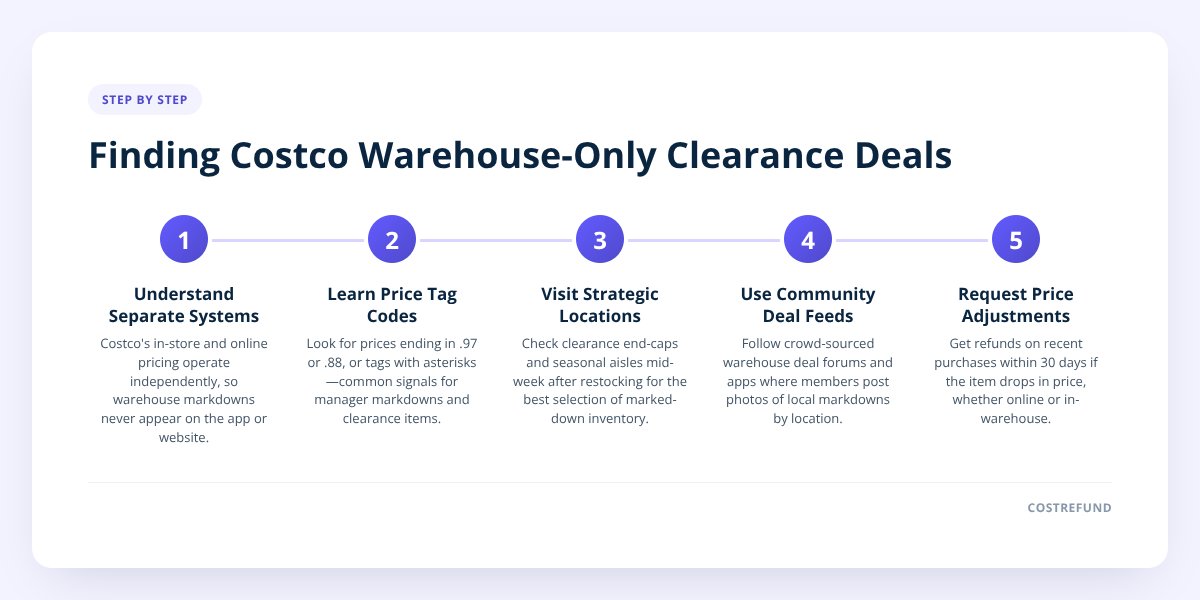
Because Costco's in-store clearance system and its e-commerce pricing system are two separate operations, and only one of them feeds the app. Costco.com reflects the online catalog — prices Costco has decided to publish nationally. Warehouse clearance is a local, manager-driven process tied to overstock, discontinued packaging, seasonal turnover, or regional demand at that specific location.
A $40 markdown on patio furniture at a warehouse in Arizona in September has nothing to do with the listing on Costco.com, and it may not even match what's happening at a warehouse 20 miles away. Costco doesn't publish a master list of every in-store clearance markdown, so there's no feed for an app to pull from. That's the core reason these deals stay invisible unless someone physically sees the tag.
This also explains why two shoppers can describe wildly different "deals of the week" from the same chain. One is reporting a national online sale. The other stumbled onto a local clearance pallet. Both are real — they're just not the same system.
How do I spot a Costco clearance price without asking an employee?
Look at the last two digits of the price tag — Costco shoppers have long used these as informal clearance signals, though Costco has not published an official explanation of the code.
- Price ending in .97 — commonly reported as a manager's markdown, often the first discount on an item being phased out.
- Price ending in .00 — sometimes seen on items being discontinued entirely, frequently the deepest cut.
- Asterisk (*) printed on the tag — widely reported to mean the item will not be reordered once current stock sells out.
- Price ending in .88 — reported on some tags as a further reduction below the .97 markdown.
None of these codes are officially confirmed by Costco in writing, so treat them as a pattern shoppers have observed over time, not a guarantee. The only sure way to know if a tag price is final is to check it at checkout, since in-store signage and register price can occasionally differ until the system updates.
Don't skip this: a warehouse-only markdown you spot on the shelf still counts for a price adjustment if you bought that same item in the last 30 days. Request the adjustment at the membership desk or customer service counter before the window closes — Costco does not extend it for missed deadlines.
Where do shoppers actually find these deals if the app doesn't show them?
Four places, reliably, none of them official Costco channels:
- Walk the clearance end-caps. Most warehouses cluster markdowns near electronics, seasonal, or the front entrance rather than scattering them through regular aisles.
- Shop mid-week, mid-morning. Many members report that restocking and re-tagging happens Tuesday through Thursday, before weekend crowds pick through what's left.
- Check community deal feeds. Shoppers post photos of markdown tags with the item, price, and warehouse location — this is the single best substitute for an official clearance list, since Costco doesn't keep one.
- Ask at the membership counter if a specific item is being discontinued nationally versus cleared locally — staff can sometimes tell you, though this isn't guaranteed and varies by location.
CostRefund's warehouse deals feed pulls together exactly this kind of crowd-reported find alongside published online markdowns, refreshed daily, so you're not relying on one person's lucky aisle walk. It currently tracks over 1,200 live Costco markdowns in the US and several hundred more in Canada, sourced from both the online catalog and member-submitted in-warehouse sightings.
Does a warehouse-only price drop qualify for a price adjustment refund?
Yes — Costco's price adjustment policy applies to any price drop within 30 days of purchase, regardless of whether the lower price is online or in a specific warehouse. The item has to be identical (same SKU, size, and model), and you need your receipt or membership number for the lookup.
Here's where it gets practical: if you paid $89.99 for a space heater three weeks ago and now see it tagged $69.97 on clearance at your local warehouse, that $20.02 difference is refundable — Costco just needs to confirm the price at that time. We go through the exact mechanics, including sale-item exceptions, in Costco Price Adjustment on Sale Items: Does It Apply?
| Scenario | Eligible for adjustment? | Notes |
|---|---|---|
| Item drops in price online within 30 days | Yes | Covered under Costco's standard policy |
| Item marked down on clearance in-warehouse within 30 days | Yes | Must be the identical item/SKU |
| Item drops in price at a different warehouse than where you bought it | Generally yes, if identical SKU | Confirm with the warehouse — regional stock differences can complicate this |
| Item is a limited one-time special buy, re-released cheaper later | No | Treated as a different item, not a markdown |
| Price drop happens after day 30 | No | Window has closed |
If you're unsure whether your specific purchase still qualifies, we lay out the full rulebook in Costco Price Adjustment on Sale Items: Does It Apply? — worth a read before you make the trip back to the warehouse.
US vs Canada: do warehouse clearance rules differ?
The underlying mechanics are the same in both countries, but a few things vary and are worth confirming locally.
- United States: Clearance tagging conventions (the .97, .00, asterisk patterns) are widely reported across US warehouses, and the 30-day price adjustment window applies as published by Costco Wholesale.
- Canada: Costco Canada operates the same general 30-day adjustment principle, but tag codes and clearance frequency can differ by region, and currency/pricing differences mean a "deal" at a US warehouse has no bearing on Canadian pricing.
- Both countries: Neither Costco US nor Costco Canada publishes an official clearance calendar or markdown list — all of this remains observation-based, from shoppers and from tools that aggregate those observations.
If you're a Canadian member, confirm your local warehouse's specific practice with staff rather than assuming a US-reported pattern holds — Costco has not published a unified cross-border policy on this.
What should I do once I find a warehouse-only markdown on something I already own?
Act inside the 30-day window, and bring proof. Here's the sequence that avoids a wasted trip:
- Photograph the clearance tag — including the item name, SKU, and the new price — in case the register price hasn't synced with the shelf tag yet.
- Pull up your receipt showing the original purchase date and price.
- Go to the membership or returns counter, not the regular checkout line, to request the adjustment.
- Mention the specific warehouse and date if the markdown you saw was at a different location than where you bought it.
- Ask for the adjustment in writing or on your receipt copy if the staff member needs to check the system — prices can take a moment to confirm.
Doing this by memory across every Costco trip is exactly the gap CostRefund's receipt tracking closes: upload your receipt once, and the app watches that purchase through its 30-day window, flags the days remaining, and alerts you the moment a tracked item drops — whether that drop shows up online or gets reported by another shopper in the warehouse feed. CostRefund identifies that the price has moved; Costco still makes the final call on approving the adjustment.
Start by creating a free account or grabbing the CostRefund app for iPhone or Android, and check today's Costco deals before your next trip so you're not relying on luck to spot the next markdown.
Checklist: Finding and claiming a warehouse-only price drop
- Scan shelf tags for prices ending in .97 or .00, or an asterisk mark.
- Walk clearance end-caps near electronics, seasonal, and the entrance on your next visit.
- Visit mid-week if possible, when restocking and re-tagging most often happens.
- Check a crowd-sourced deals feed for markdowns reported at other warehouses.
- Photograph the clearance tag with the item name, SKU, and new price.
- Pull your receipt and confirm you're still inside the 30-day window.
- Bring both to the membership or returns counter and request the adjustment.
- Track the purchase in the CostRefund app so you get alerted automatically next time.
Related articles
Blog by Segeo — new article every day.
Keep reading
- Costco Alcohol Return Policy: What Drinks Can You ReturnOctober 11, 20269 min read
- Costco Appliance Return Policy Explained Step by StepOctober 8, 20268 min read
- Can Someone Else Claim a Costco Price Adjustment on a Gift?October 1, 20269 min read
- Costco Return Policy Without a Receipt: How It WorksSeptember 30, 20268 min read
- Costco vs Sam's Club: Price Adjustment ComparedSeptember 29, 20269 min read
- Costco TV Return Policy: Windows and Refund TipsSeptember 28, 20268 min read
Start Saving on Costco Today
CostRefund automatically monitors price drops and helps you claim refunds. Create your free account and never leave money on the table again.
Start Saving





