

Costco Return Policy Without a Receipt: How It Works

Quick answer: Costco can usually look up your purchase using your membership number, since every purchase is tied to your account, so a missing paper receipt often isn't a dealbreaker for returns. Costco does not publish a guaranteed no-receipt return policy, and eligibility is decided at the warehouse or by Costco Member Services on a case-by-case basis. Some categories, like electronics and diamonds over a certain value, have their own documented time limits regardless of receipt status. The safest move is always to have proof of purchase ready, and to check Costco's own return policy page for the current wording before you head to the warehouse.
Key takeaways
- Costco ties purchases to your membership number, so lookup without a paper receipt is often possible, but Costco does not publish this as a guaranteed right.
- Costco's general merchandise return policy allows returns "at any time" per Costco's published policy, but electronics, TVs, mattresses, and a few other categories have separate, stricter windows.
- Costco's policy is silent on exactly what happens when a purchase can't be found in the system at all — that outcome is left to the discretion of the warehouse or Member Services.
- Keeping receipts (a paper copy, an email receipt, or an app like CostRefund that stores them automatically) removes the guesswork entirely.
Does Costco Require a Receipt for Returns?
No — Costco's published return policy does not list a receipt as a requirement, because your membership number typically serves as your proof of purchase. Every time you buy something at Costco, whether in the warehouse or online, that purchase is logged against your membership account. Staff can often pull up your purchase history at the register or at the returns counter using that number alone.
This is different from most retailers, where a receipt or the original payment card is often the only accepted proof. Costco's model works because membership is the anchor. That said, "often possible" is not the same as "guaranteed" — Costco's policy doesn't spell out what happens if a purchase somehow isn't in the system, and we won't pretend it does.
For the full breakdown of what the general policy actually says — including the "any time" language and its exceptions — see our post on the Costco return policy.
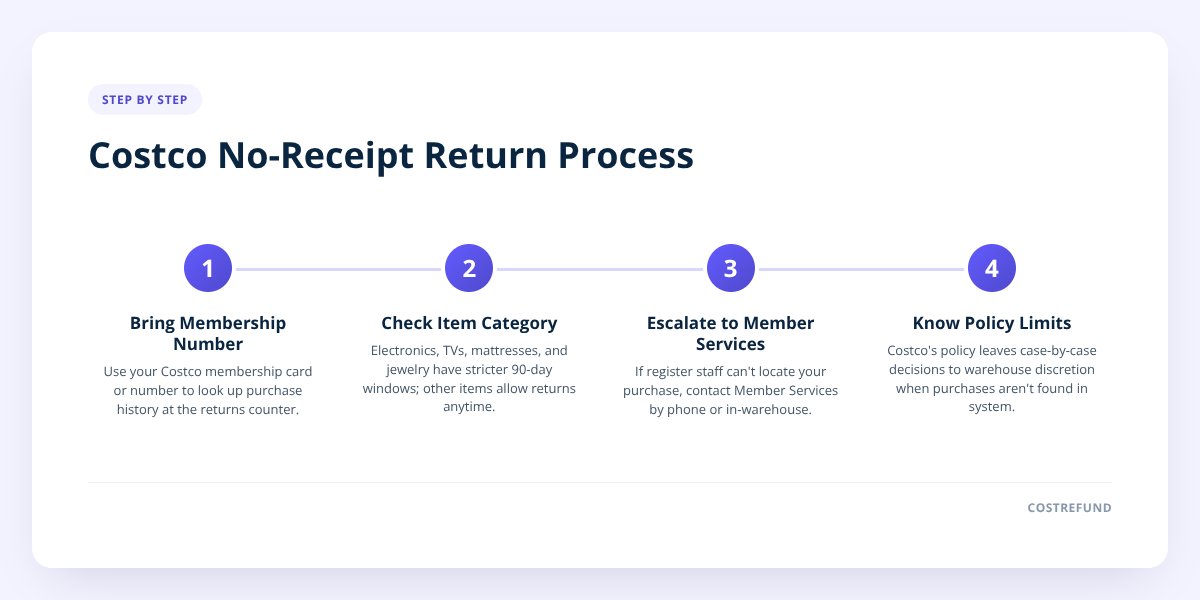
Step 1: Try Your Membership Number First
Before you do anything else, bring your Costco membership card or know your membership number. This is the single most useful thing you can hand a returns associate when you don't have a receipt.
- Locate your membership card, physical or digital in the Costco app.
- Confirm the card matches the account used to make the original purchase — joint accounts and household cards can complicate lookup.
- Have a rough idea of when you bought the item, since this can help staff narrow the search.
- Bring the original payment card if you have it, as a backup identifier.
Staff will typically search your purchase history electronically. If the item shows up, you're usually in good shape — the process from there looks like any standard return.
Step 2: Know Which Categories Have Their Own Rules
This matters more without a receipt, because the item itself may already limit what's possible. Costco's published policy carves out specific categories with their own time limits, separate from the general "any time" rule for most merchandise.
| Category | Documented limit | Notes |
|---|---|---|
| Electronics (TVs, computers, etc.) | 90 days from purchase | Per Costco's return policy; covered in our 90-day rule explainer |
| TVs specifically | 90 days from purchase | See our TV return policy guide for condition and packaging notes |
| Mattresses | Costco publishes a satisfaction-guarantee return policy for mattresses | Details in our mattress return policy post |
| Major appliances | Limited return window per Costco's policy | Confirm current timeframe with Costco directly |
| Diamonds and certain fine jewelry over a stated value | Return requires the item and its original documentation | Check Costco's current policy for the exact dollar threshold |
Don't skip this: if the item you're returning falls into one of these carved-out categories, the countdown started on your purchase date whether or not you kept the receipt. A membership-number lookup can confirm that date — and it may already be too late.
For everything outside these named exceptions, Costco's general policy is the "any time" standard, which gives more flexibility if a receipt is missing.
Step 3: Call or Visit Member Services When the Register Can't Help
If the front-line return desk can't locate your purchase, the next step is Costco Member Services, either at the warehouse or by phone. Member Services has broader access to account and purchase history than a standard checkout terminal in some cases, and staff there can advise on what documentation, if any, is still needed.
We've covered how to approach this call for price adjustment situations in calling Costco Member Services for a refund, and much of the same etiquette applies to a no-receipt return: have your membership number ready, describe the item and approximate purchase date clearly, and ask directly what your options are.
Costco's official channel for these questions is Costco Customer Service, and that's the best place to confirm current wording before you travel to a warehouse — policy details can be updated, and only Costco's own page reflects what's current today.
Step 4: Understand Where the Policy Goes Silent
Costco's published return policy does not spell out what happens if your purchase truly cannot be verified — no membership record, no card match, nothing. This is a genuine gap in the public policy, not an oversight on our part in explaining it.
In practice, this kind of situation is handled at the discretion of the warehouse or Member Services, and outcomes can vary. We're not going to tell you a workaround or a way to "improve your odds" here, because Costco hasn't published one. If you're in this position, your best move is to ask Member Services directly what they need from you and go from there.
This is also where online purchases differ slightly from in-warehouse ones. Costco.com orders generate an email confirmation and an order history under your account login, which functions as a digital receipt even if you never print anything. If you bought online, check your Costco.com order history before assuming you have "no receipt" at all.
Why Keeping Every Receipt Avoids This Entirely
The cleanest way to never face this situation is to stop relying on paper. A physical receipt fades, gets lost in a bag, or ends up in the recycling before you realize you needed it — and that's true whether you're dealing with a return or a price adjustment.
This is exactly the gap CostRefund was built to close. When you scan a Costco receipt into the app, it's stored digitally and tracked automatically for 30 days for potential price adjustments — CostRefund identifies purchases that may qualify for a refund when the price drops, and Costco determines the final eligibility and approval. Members have logged over $18,000 in confirmed savings this way, and having every receipt in one place also means you're never digging through a glove compartment looking for proof of purchase for a return.
- Scan the receipt right after checkout, before it has a chance to get lost.
- Let the app track the 30-day price adjustment window automatically.
- Use the same stored record as backup proof of purchase if you ever need a return.
- Check Costco price adjustment rules to see how the refund side of this works alongside returns.
If you want to see the mechanics behind that tracking in more detail, our post on the Costco price adjustment tracker that actually works walks through it step by step.
What to Do Next
If you're standing at a Costco return counter right now without a receipt, lead with your membership number — that's the fastest path to a resolution. If the item falls under electronics, TVs, mattresses, or another carved-out category, check that you're still inside the documented window before you go. And if this is the second time you've been caught without proof of purchase, it's worth building the habit of scanning every receipt going forward, so the next return — or the next price drop — doesn't depend on finding a slip of paper.
Ready to stop losing receipts for good? Download CostRefund and let it track your Costco purchases automatically, so you're covered for both returns and refunds.
Checklist: Returning a Costco Item Without a Receipt
- Locate your Costco membership card or number before heading to the warehouse.
- Bring the original payment card as backup identification.
- Check your Costco.com order history if the purchase was made online.
- Confirm which category your item falls under — general merchandise, electronics, mattress, or appliance.
- Verify the documented time limit for that category, since some run separately from the general policy.
- Ask the return desk to look up your purchase by membership number first.
- Escalate to Member Services if the register can't locate the item.
- Scan future receipts into an app like CostRefund so this doesn't happen again.
Related articles
Blog by Segeo — new article every day.
Keep reading
- Costco vs Sam's Club: Price Adjustment ComparedSeptember 29, 20269 min read
- Costco Price Adjustment Processing Time: What to ExpectSeptember 27, 20267 min read
- Costco Price Adjustment In-Store: What to ExpectSeptember 25, 20268 min read
- Costco Price Calculator: Estimate Your RefundSeptember 23, 20267 min read
- Costco Bulk Purchases: How Price Adjustments Really WorkSeptember 22, 20269 min read
- Costco Price Adjustment: The Complete 2026 GuideSeptember 22, 20265 min read
Start Saving on Costco Today
CostRefund automatically monitors price drops and helps you claim refunds. Create your free account and never leave money on the table again.
Start Saving





