
Does Costco's 30-Day Rule Apply to Flash Sales?

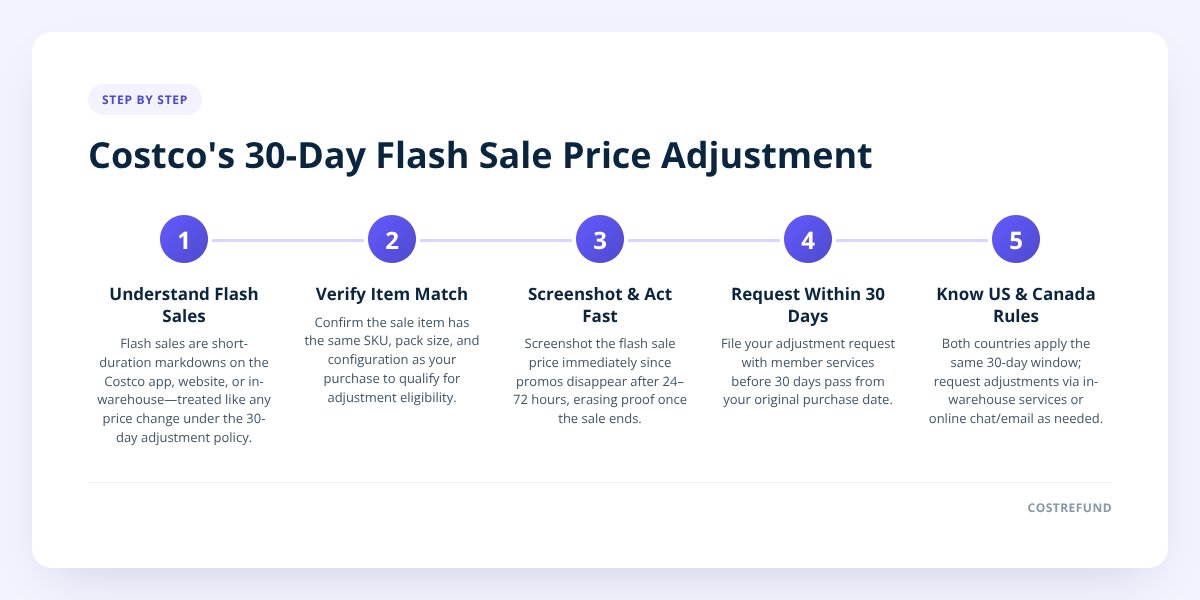
Quick answer: Yes — a flash sale or app-exclusive deal still counts as a price drop for Costco's 30-day price adjustment window, as long as the item is the same item and you bought it within the last 30 days. The catch is timing: flash sales often run for just 24 to 72 hours, so if you don't catch the drop while it's live, you may never see it logged anywhere once it ends. There's no separate "flash sale" rule in Costco's published policy — it's the regular adjustment window, just with a much shorter chance to notice.
Key takeaways
- Costco's standard price adjustment window is 30 days from purchase, and flash or app-only deals fall under that same policy — there's no shorter window just because the sale was short.
- The real risk isn't eligibility, it's visibility: a flash sale that lasts a few days can come and go without leaving a trace on Costco.com or in-warehouse signage.
- Costco Canada and Costco US both run temporary promotions, and both apply the 30-day rule the same way — the difference is in how each country's members typically request the adjustment.
- Manually checking prices every day for 30 days on every item you buy isn't realistic, which is why tools like CostRefund's price-drop monitoring exist to catch drops while the window is still open.
Costco owes you money when prices drop
If something you bought gets cheaper within 30 days, you can claim the difference. CostRefund watches your receipts and tells you when you're owed.
Start freeStep 1: Understand what counts as a "flash sale" in Costco's world
Costco doesn't use the term "flash sale" in its own policy language, but shoppers use it to describe any markdown that's live for a short, defined burst of time — often a weekend, sometimes just a single day. These show up in a few places:
- Costco app push notifications for a limited-time price drop on a specific item.
- Online-only markdowns on Costco.com that aren't matched in warehouses.
- Member-exclusive pricing tied to a short promotional calendar, sometimes called out in the monthly coupon book.
- In-warehouse clearance tags that appear and disappear fast as a location clears stock.
None of these are a separate category under Costco's return and adjustment policy. They're just a price change — and any price change on an item you bought in the last 30 days is a candidate for an adjustment, the same as a regular seasonal markdown. We cover how the general window works item by item in our full chart of adjustment windows by category.
Step 2: Confirm the sale item is actually "the same item" you bought
This is where flash sales get tricky, because short promotions sometimes swap in a slightly different SKU, pack size, or bundle than what you originally purchased. Costco's adjustment policy requires the item to match — same product, same size, same configuration — not just a similar one at a lower price.
A few common mismatches to watch for:
- A flash-sale version sold as a multi-pack or bundle when you bought single units (or vice versa).
- A seasonal color or flavor variant marketed as a limited drop, technically a different item number.
- An online-exclusive bundle that includes an accessory your in-warehouse purchase didn't.
If you're not sure whether a promo item truly matches yours, this is exactly the gray area we walked through in what counts as the same item for a Costco price adjustment. When in doubt, bring both receipts or screenshots and let the member services desk make the call — Costco decides final eligibility, not the shopper or any third-party app.
Step 3: Act inside the sale window, not after it ends
Don't skip this: A flash sale disappearing from the app or website doesn't erase your right to an adjustment during your 30-day window — but it does erase the easiest proof that the price ever existed. Screenshot the price the moment you see it.
Here's the sequence that actually matters:
- You buy an item on, say, October 1.
- A flash sale drops the price on October 12 for 48 hours only.
- The sale ends on October 14, and the price reverts to normal (or moves to a different promo).
- You don't notice until October 20.
In this case, you're still well inside the 30-day window from your October 1 purchase — you have until roughly October 31 to request the adjustment. The problem is proving the price existed on October 12 to 14, since Costco.com won't show a sale that's already over, and in-warehouse signage gets pulled the day the promo ends.
That's why the screenshot (or a saved receipt, deal alert, or email) matters more for flash sales than for longer-running markdowns. A sale that runs for three weeks gives you time to notice it organically. A sale that runs for three days often doesn't.
Step 4: Know how US and Canada handle it differently
Both countries apply the same underlying logic — a price drop within 30 days of purchase is eligible for review — but the practical experience of catching a flash sale differs.
| Costco US | Costco Canada | |
|---|---|---|
| Standard adjustment window | 30 days from purchase | 30 days from purchase |
| Flash sales treated as separate policy | No — same window applies | No — same window applies |
| Where to request it | In-warehouse member services, or Costco.com chat/email for online orders | In-warehouse member services, or Costco.ca customer service for online orders |
| App-exclusive deals common | Yes, frequent push notifications | Yes, though promo cadence can differ by region |
| Proof typically accepted | Receipt plus current price evidence | Receipt plus current price evidence |
We go deeper on the Canada-specific claim process, including what documentation member services tends to ask for, in how the Costco Canada price adjustment refund really works. If you bought through Costco.com or Costco.ca rather than in-warehouse, the online claim path is a little different too — we walk through the form itself in the Costco online price adjustment form guide.
Step 5: Build a system so you're not relying on luck
Realistically, nobody checks the Costco app every day for a month after every single purchase. That's the actual reason most flash-sale adjustments get missed — not because the shopper didn't qualify, but because nobody was watching at the right moment.
A few ways shoppers try to stay on top of it manually:
- Set a recurring phone reminder to check prices on recent big purchases.
- Keep a running spreadsheet of purchase dates and 30-day deadlines.
- Follow Costco deal threads or forums for flash-sale alerts.
- Check the app notification settings to make sure promo alerts are turned on.
All of these work to some degree, but they all depend on the shopper remembering to look, every day, for things they bought weeks ago. That's the gap CostRefund's receipt scanning and price-drop monitoring is built to close — you upload the receipt once, and the app watches that purchase through its 30-day window and sends an alert the moment a drop (flash sale or otherwise) lands, so you still have time to go ask. We detail how the day-to-day tracking works in how to track Costco purchases for a price adjustment refund.
To be clear: CostRefund identifies that a price drop happened and that your purchase may qualify. Costco still makes the final call on approving any adjustment.
Step 6: Request the adjustment the right way, fast
Once you've confirmed the item matches and you're inside the 30-day window, request the adjustment the same way you would for any markdown — the flash sale timing doesn't change the process itself. For in-warehouse purchases, bring your receipt to member services. For online orders, Costco.com typically handles adjustment requests through customer service or live chat, and Costco Canada routes through Costco.ca support.
If the item was discounted through the monthly coupon book rather than an app flash sale, that's a slightly different (and more predictable) case — check our breakdown of the current coupon book to see what's running now.
Getting this right every time, for every receipt, is tedious to do by hand. That's really the whole point of building a habit around a tracking tool instead of your memory.
Ready to stop missing short-lived deals? CostRefund scans your Costco receipts, watches your purchases through the 30-day window, and sends an alert the moment an eligible item drops in price — flash sale or not. Start tracking your receipts or grab the app before the next flash sale comes and goes.
Checklist: catching a flash-sale price adjustment before the window closes
- Screenshot the sale price and date the moment you spot a flash-sale markdown.
- Compare the item number, size, and bundle contents against your original receipt.
- Confirm your purchase date falls within the last 30 days.
- Save or forward any app push notification or promo email as backup proof.
- Visit member services in-warehouse, or contact Costco.com/Costco.ca support for online orders.
- Bring both your original receipt and your sale-price evidence to the request.
- Upload your receipts to a tracking app so future flash sales don't slip past you unnoticed.
Related articles
Blog by Segeo — new article every day.
Keep reading
- Costco Gold Bars 2026: Price, Limits and ReturnsOctober 22, 20268 min read
- Costco Business Center Price Adjustment: How It DiffersOctober 21, 20269 min read
- Costco Food Return Policy: Groceries and PerishablesOctober 12, 20268 min read
- Can Someone Else Claim a Costco Price Adjustment on a Gift?October 1, 20269 min read
- Costco Price Calculator: Estimate Your RefundSeptember 23, 20267 min read
- Costco Price Adjustment on Sale Items: Does It Apply?October 7, 20268 min read
Start Saving on Costco Today
CostRefund automatically monitors price drops and helps you claim refunds. Create your free account and never leave money on the table again.
Start Saving





