

Costco Starlink Price Adjustment: How to Track Refunds

Quick answer: Starlink kits qualify for Costco's standard 30-day price adjustment policy, the same window that applies to most warehouse electronics. Because Starlink pricing at Costco has moved around a fair amount since it launched there, buyers who watch the price after purchase have a real shot at getting money back. You request the adjustment from the same place you bought it — in warehouse or online — and the price drop has to be on the identical SKU within 30 days of your purchase date.
Key takeaways
- Starlink follows Costco's general 30-day price adjustment policy — there's no special short window for this item, per Costco's published return and adjustment guidance at customerservice.costco.com.
- The adjustment applies only to the identical SKU and configuration — a standard kit marked down doesn't help if you bought the high-performance kit.
- In-warehouse purchases get adjusted at the membership counter; online purchases go through Costco's online customer service, and the process can take longer to resolve.
- Satellite internet hardware pricing changes with inventory and promotions, so a receipt bought today could be eligible for a refund weeks later if the price drops before day 30.
Costco owes you money when prices drop
If something you bought gets cheaper within 30 days, you can claim the difference. CostRefund watches your receipts and tells you when you're owed.
Start freeIs Starlink eligible for a Costco price adjustment?
Yes. Starlink hardware kits sold at Costco fall under the same price adjustment policy as other electronics in the warehouse, which Costco documents as a 30-day window from the date of purchase, according to customerservice.costco.com. There's no separate carve-out for satellite internet equipment — it's treated like a TV, a laptop, or any other big-ticket electronics purchase.
What makes Starlink worth watching closely is the price movement itself. Costco's listed price for Starlink kits has shifted across different price points over time as inventory, bundle configurations, and promotional periods change. When a single item's price has that much variability, the odds that it drops again within 30 days of your purchase go up.
This is also a genuinely expensive item to get wrong. A price swing of even $50 to $100 on a single purchase is a bigger deal than the same swing on a $20 grocery item — which is exactly why it's worth tracking instead of just hoping you bought at the right time.
Don't skip this: The 30-day clock starts on your purchase date, not the date you notice the price drop. If you spot a lower price on day 29, you still need to act immediately — there's no grace period once day 30 passes.
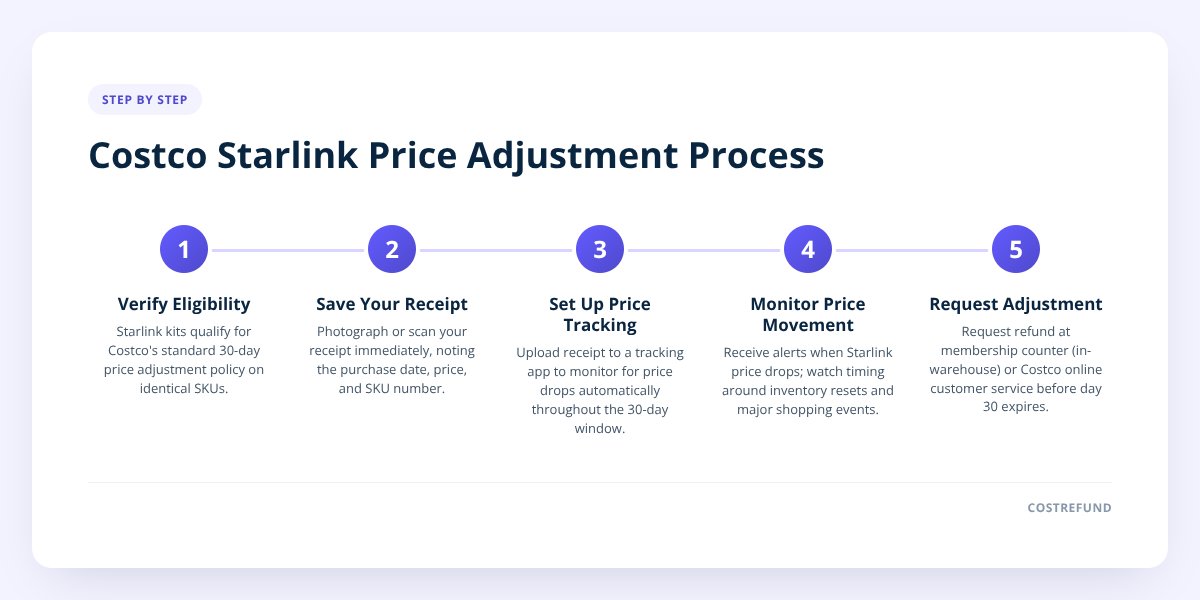
Step 1: Save your receipt the day you buy
Your Costco receipt is the only proof of your purchase date and purchase price, so don't let it sit in a bag or a glovebox. For in-warehouse purchases, that's the paper receipt. For online orders, it's the order confirmation and invoice from your Costco.com account.
Do this immediately after buying:
- Photograph or scan the receipt before you leave the parking lot.
- Note the exact item description and SKU number printed on the receipt.
- Save the order confirmation email if you bought Starlink online.
- Write down (or screenshot) the purchase date — this is what starts your 30-day countdown.
Scanning the receipt into a tracking app does this automatically and reads the line items for you, which matters a lot for a product line like Starlink that has more than one SKU in circulation at a time.
Step 2: Set up price tracking instead of checking manually
Checking Costco's price on Starlink every few days by hand is the most common way people miss a refund — not because they didn't care, but because they forgot, or the price dropped on a day they didn't look. This is the exact problem receipt scanning and price-drop monitoring solves: you scan the receipt once, and the tracking runs in the background for the rest of your adjustment window.
Here's the basic workflow once a receipt is in a tracking app like CostRefund:
- Upload or scan the receipt right after purchase.
- The app identifies the Starlink line item and tags it for monitoring.
- You can tap the item to correct the SKU or description if it's not read correctly.
- The app checks the current price against what you paid, every day the window is open.
- You get an alert the moment the price drops below what you paid — not days later.
- The app shows your purchase price, the current price, the potential saving, and how many days are left to claim.
That last part is the one people underestimate. Knowing the number of days left in your window is often more useful than knowing the current price, because it tells you how much urgency you actually have. We walked through this process in more depth in How Receipt-Scanning Apps Catch Costco Price Drops, if you want the mechanics behind the alerts.
When does Starlink pricing typically change at Costco?
There's no fixed sale calendar Costco publishes for Starlink specifically, but electronics pricing at the warehouse tends to move around a few predictable periods: major shopping events (Black Friday and the weeks around it), post-holiday inventory resets in January, and whenever Costco adjusts its warehouse stock mix for a category. Costco's own markdown patterns for electronics are documented loosely through its member coupon books and in-warehouse signage, not through an advance public calendar.
What that means practically: don't assume the price you see today is stable just because it hasn't moved in a few weeks. Big-ticket electronics items like Starlink can be marked down with no warning tied to a broader sale event, and warehouses don't all carry the same price at the same time.
| Signal | What it suggests |
|---|---|
| Price listed in the current Costco coupon book | A temporary instant-savings period, often shorter than 30 days |
| Price drop with no coupon book mention | Inventory-driven markdown, can happen anytime |
| Different price across two warehouses | Normal — local pricing varies by location |
| Online price differs from in-warehouse price | Expected; they're tracked and adjusted separately |
If you want a sense of what's currently marked down warehouse-wide, costrefund.com/costco-deals refreshes daily and covers more than just Starlink.
What to do when Starlink goes on sale after you buy it
Go back to wherever you bought it — in warehouse purchases get adjusted at the membership counter, and online purchases go through Costco's online customer service. The process and paperwork differ slightly between the two.
If you bought in-warehouse:
- Bring your original receipt (paper or the photo you saved) to the membership counter.
- Point out the current, lower price on the identical SKU.
- Costco staff process the price difference as a refund, typically to your original payment method.
- Do this before your 30-day window from the purchase date closes.
If you bought online:
- Log into your Costco.com account and find the order.
- Contact Costco's online customer service to request the adjustment, referencing the order number.
- Expect this to take longer to resolve than an in-warehouse request, since it's handled through a support queue rather than at a counter.
- Keep your original order confirmation email as backup documentation.
One thing that trips people up specifically with Starlink: Costco sometimes sells more than one kit configuration (standard vs. high-performance, for example), and the adjustment only applies if the discounted item is the identical SKU you bought — not just the same general product. We cover exactly what "identical item" means for Costco's adjustment rules in Costco Price Adjustment: What Counts as the Same Item?, which is worth a read before you go ask for a refund on a kit that technically isn't a match.
Does membership status or return history affect eligibility?
Your membership needs to be active and in good standing, but Costco doesn't publish any additional barrier specific to Starlink or to price adjustments generally beyond the 30-day window and identical-item requirement, per customerservice.costco.com. A few things people ask about:
- Do I need a Gold Star vs. Executive membership? Costco's price adjustment policy doesn't document a tier requirement — both membership levels get the same adjustment window.
- Does a prior return affect my eligibility for an adjustment? Costco doesn't publish a connection between return history and price adjustment eligibility; these are handled as separate policies.
- What if I bought Starlink as a gift for someone else? The person claiming the adjustment generally needs the original receipt and membership tied to the purchase — we go deeper on gift scenarios in Can Someone Else Claim a Costco Price Adjustment on a Gift?
- Why wouldn't a specific Starlink SKU qualify? If Costco has discontinued that SKU, replaced it with a new model, or the "lower price" you're seeing is actually a different bundle or configuration, it won't count as the identical item.
If anything about your specific situation seems unclear, Costco's customer service line or the membership counter is the authoritative source — the published policy is a general framework, and warehouse staff apply it to the specific receipt in front of them.
What to do next
The window that actually costs people money isn't the policy itself — it's the 30 days after you buy when nobody's watching the price for you. If you just bought a Starlink kit, scan that receipt today rather than letting it sit in a drawer until you remember.
CostRefund tracks the purchase against Costco's current price automatically and sends an alert the moment it drops, so you're not relying on memory for a window that closes fast. CostRefund identifies the potential price-adjustment opportunity — Costco makes the final call on eligibility and approval at the counter or through its online support team. Start by creating a free account at costrefund.com/start or grab the app at costrefund.com/download.
Checklist: Track and claim a Starlink price adjustment
- Save your Costco receipt or online order confirmation the day you buy.
- Note the exact SKU and purchase date printed on the receipt.
- Scan or upload the receipt into a price-tracking app right away.
- Check that the app correctly identified the Starlink line item, and correct it if not.
- Watch for a price-drop alert during your 30-day window.
- Confirm the lower price is on the identical SKU, not a different kit configuration.
- Visit the membership counter for in-warehouse purchases, or contact online customer service for web orders.
- Request the adjustment before day 30 from your original purchase date.
Related articles
Blog by Segeo — new article every day.
Keep reading
- Costco Mattress Return Policy: The 120-Day Window ExplainedOctober 25, 20268 min read
- Does Costco Marketplace Price Adjustment Apply to Sellers?October 16, 20267 min read
- Costco Price Adjustment on Sale Items: Does It Apply?October 7, 20268 min read
- Walmart Price Adjustment vs Costco: What's the Difference?October 5, 20268 min read
- Costco Bundle Price Adjustment: What Refund You Can GetOctober 3, 20269 min read
- Can Someone Else Claim a Costco Price Adjustment on a Gift?October 1, 20269 min read
Start Saving on Costco Today
CostRefund automatically monitors price drops and helps you claim refunds. Create your free account and never leave money on the table again.
Start Saving





