
7 Costco Deals You'll Never Find Browsing Online

Quick answer: Costco's website only shows a fraction of what's actually marked down inside the warehouse — clearance stickers, manager markdowns, endcap blowouts, and regional closeouts almost never make it to Costco.com. To catch them, you have to walk the aisles yourself or rely on other shoppers reporting what they saw, which is exactly the gap tools like warehouse deals discovery in the CostRefund app try to close.
Key takeaways
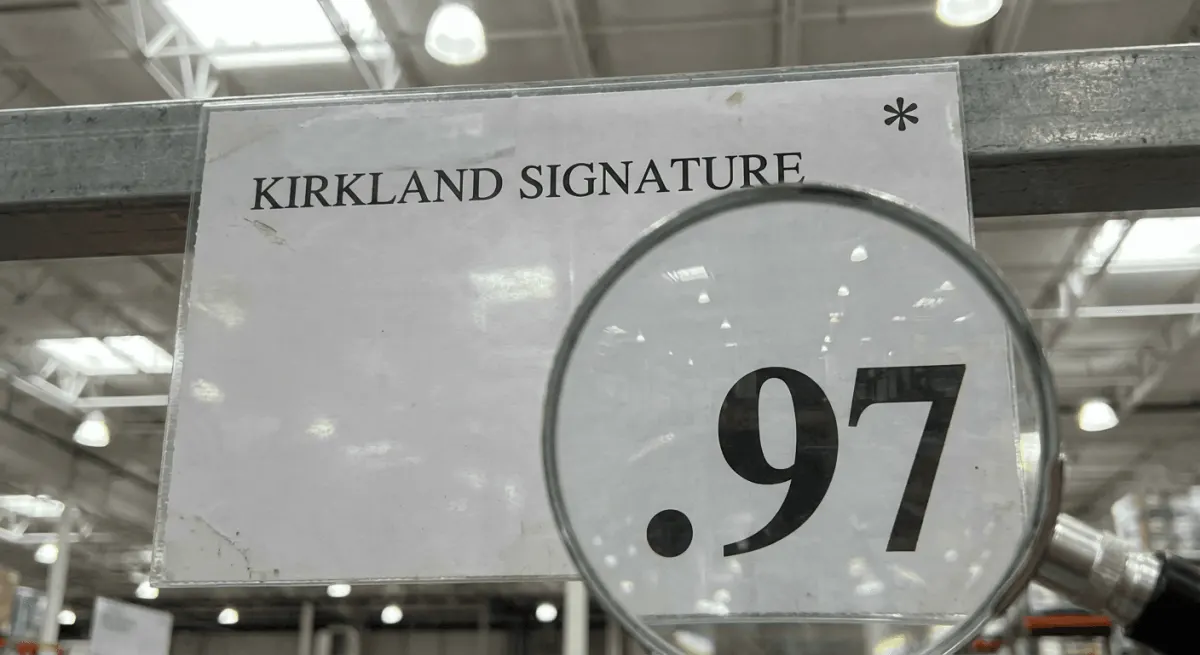
- Costco's clearance system uses price endings like $X.97 to signal markdowns, and that code only shows up on the in-store shelf tag, never on Costco.com.
- Regional and single-warehouse closeouts (a discontinued local vendor item, a warehouse remodel, an overstock at one location) are almost always in-store only because they're inventory problems specific to that building.
- Costco's official return and price adjustment policies apply to in-warehouse purchases the same way they apply to online ones — the deal type doesn't change your 30-day adjustment window.
- Crowdsourced sightings from other shoppers are often the fastest way to find these markdowns, since Costco doesn't publish a clearance list anywhere.
Bought it already? Don't miss the price drop
If the price falls within 30 days of purchase, Costco can refund the difference. CostRefund tracks what you bought and alerts you.
Start free1. The $X.97 Clearance Sticker
This is the single most reliable in-store-only signal, and it's worth memorizing. Costco marks down clearance and discontinued items with price tags ending in ".97," while a price ending in ".00" or ".88" usually signals a manufacturer-driven promo price, according to widely documented Costco pricing conventions that longtime members and former employees have described for years.
You will not see this pricing logic reflected anywhere on Costco.com, because the site doesn't republish in-warehouse clearance pricing at all. The only way to catch a $.97 tag is to actually look at the shelf — or have someone else who spotted it tell you.
2. Manager Markdowns on Damaged or Near-Expiry Packaging
Every warehouse has discretion to mark down items with dented cans, torn boxes, or approaching sell-by dates, and these get slapped with a red or orange tag right on the shelf. This kind of markdown is hyper-local: it depends on what got damaged in that specific warehouse that week, so it will never show up as a listing online.
A few things worth knowing about these:
- They're usually one-off quantities — once it's gone, it's gone, with no restock.
- The discount size varies warehouse to warehouse; there's no fixed percentage.
- Food items near their sell-by date are still safe to buy at full quality, they're just being cleared for inventory turnover reasons.
3. Endcap Blowouts on Seasonal Overstock
Walk past the big end-of-aisle displays in late summer or right after a holiday, and you'll often find last season's patio furniture, holiday decor, or seasonal apparel slashed well below the original tag. This is Costco clearing floor space for the next season's shipment, and it happens on a warehouse-by-warehouse basis depending on how much unsold stock each location has.
Because the online catalog is built around what's currently being actively promoted nationally, these localized overstock blowouts almost never get an online mirror. If you're chasing seasonal savings, this is one of the few places where showing up in person genuinely beats scrolling from home — timing matters more than searching does, and it connects to a broader pattern we cover in why Costco prices swing more in some years than others.
4. Regional Vendor Closeouts
Costco's warehouses don't all carry identical inventory — regional suppliers, local produce partnerships, and test products specific to a state or province mean that when one of those items gets discontinued, the closeout only affects the warehouses that stocked it. A Pacific Northwest warehouse might clear out a local bakery item that a Texas warehouse never carried in the first place.
These closeouts are essentially invisible outside the region unless someone physically posts about it. This is one of the biggest reasons a community sighting — a friend, a local Facebook group, or a shared alert in an app — beats searching Costco.com, which by design only reflects nationally standardized listings.
5. Kirkland Signature Package Redesign Clearance
When Costco updates the packaging on a Kirkland Signature product, the old packaging often gets marked down to clear out remaining stock before the new design fully rolls in. This happens with everything from snacks to household goods, and it's driven purely by warehouse-level inventory — not a national sale event.
Don't skip this: if you buy an item at full price and then spot the same item with a lower clearance tag within 30 days at any Costco location, you may be eligible for a price adjustment refund. Costco's published policy allows price adjustments within 30 days of purchase with your receipt — it's worth checking before you assume the lower price only applies to new buyers.
6. "As Marked" Liquidation Pallets Near the Front
Some warehouses run occasional liquidation pallets near the entrance or checkout lanes, loaded with a mixed batch of clearance electronics, seasonal goods, or returned items marked "as-is" or "as marked." These pallets rotate fast and are filled based on what that specific building needs to clear, so there's no online equivalent — and often no advance notice even to regular shoppers at that location.
If you see one, it's usually worth a quick look even if you weren't planning to buy anything, since pricing on these pallets tends to be steeper than standard clearance tags. Just confirm return eligibility before buying "as-is" merchandise, since some liquidation items are marked final sale.
7. Baby Gear and Car Seat Clearance Runs
Costco periodically clears out car seats, strollers, and baby gear when a model gets discontinued or replaced by a manufacturer update, and this tends to happen in-store well before (or instead of) any online notice. Because baby gear models change frequently and safety-related recalls or updates move fast, warehouses often need to clear old stock quickly.
If you recently bought baby gear at full price, it's worth checking shelves periodically for 30 days after your purchase — we go deeper on how to actually claim that adjustment in how to get a Costco price adjustment on baby gear. The refund window is the same as any other item, but baby gear markdowns are especially easy to miss since they rarely get any kind of announcement.
Your In-Warehouse Deal-Hunting Checklist
Before your next Costco run, run through this list to make sure you're not walking past savings:
- Scan shelf tags for prices ending in .97 as you walk each aisle.
- Check endcaps first — that's where seasonal and overstock blowouts get staged.
- Look near the entrance and checkout for liquidation pallets marked "as-is" or "as marked."
- Ask a floor employee if a specific item is being discontinued or replaced with new packaging.
- Keep your receipt (paper or digital) for 30 days after every purchase, in case a markdown appears later.
- Compare in-store clearance pricing against your recent receipts using a price-drop tracker before assuming you missed the window.
Keeping digital copies of every receipt makes all of this far less painful when it's time to actually request a refund — we walk through a simple system in how to organize digital receipts for Costco refunds.
In-Store Deals vs. Online Deals: What Actually Differs
| In-Warehouse Deals | Costco.com Deals | |
|---|---|---|
| Visibility | Only visible if you're physically in the store | Listed publicly, searchable anytime |
| Typical source | Clearance tags, manager markdowns, regional overstock | National promotions, coupon books, seasonal sales |
| Consistency across locations | Varies by warehouse | Same for all shoppers nationwide |
| How you find out | Word of mouth, community sightings, walking the aisles | Email, app, website browsing |
| Price adjustment eligibility | Yes, within Costco's standard 30-day window | Yes, though online orders follow a slightly different refund process |
If your original purchase was made online rather than in-warehouse, the adjustment process looks a little different — that's covered fully in Costco.com online order refunds: what to expect step by step.
Turning Random Sightings Into Actual Savings
The honest truth is that no single shopper can walk every warehouse in the country, which is why in-store-only deals are so easy to miss even for people who shop Costco weekly. The fix isn't shopping more often — it's tapping into what other people are already seeing.
That's the entire idea behind CostRefund's warehouse deals discovery feature: shoppers report markdowns they find in real time, so you see clearance tags and manager specials spotted at other locations without having to be there yourself. Pair that with receipt scanning that tracks your purchases for 30 days, and instant alerts when something you bought drops in price, and you stop relying on luck to catch these deals. If you shop cross-border, it's also worth knowing Canadian pricing and adjustment rules differ slightly from the US — we cover that in how Canadian shoppers can track cross-border Costco deals.
Ready to stop missing markdowns that never make it online? Download CostRefund and let the community's live activity feed do the aisle-walking for you.
Related articles
Blog by Segeo — new article every day.
Keep reading
- Costco Price Adjustment Window by Category: The Full ChartSeptember 12, 20268 min read
- How to Organize Digital Receipts for Costco RefundsSeptember 9, 20268 min read
- Costco Air Fryers 2026: Best Prices, Deals and Return RulesOctober 22, 20267 min read
- Costco Warehouse-Only Deals: Finding Drops the App MissesOctober 9, 20268 min read
- Costco Online Price Adjustment Form: How to Use ItSeptember 22, 20263 min read
- How Canadian Shoppers Can Track Cross-Border Costco DealsAugust 23, 20268 min read
Start Saving on Costco Today
CostRefund automatically monitors price drops and helps you claim refunds. Create your free account and never leave money on the table again.
Start Saving





