

Costco Price Adjustment Without a Receipt: How To Get One

Quick answer: You can still request a Costco price adjustment without a paper receipt, because Costco can look up your purchase using your membership number — every purchase is tied to your account. Bring your membership card to Member Services, give them the approximate purchase date and item, and staff can pull the transaction from Costco's system. This works best within Costco's 30-day adjustment window, and it's more reliable for in-warehouse purchases than online orders.
Key takeaways
- Your membership number is your real proof of purchase — Costco's point-of-sale system logs every purchase against your account, receipt or not.
- Costco's standard price adjustment window is 30 days from the purchase date; this is documented on customerservice.costco.com and applies whether or not you have the receipt.
- Online orders are easier to verify without a paper receipt than in-warehouse purchases, since your order history is already in your Costco.com account.
- Canadian members follow the same 30-day lookup process, but a few category exceptions (like Costco Canada's treatment of certain electronics) can differ from the US — confirm specifics with Member Services.
- CostRefund's receipt scanning keeps a digital copy of every purchase the moment you shop, so you're never relying on memory or a lost slip later.
Costco owes you money when prices drop
If something you bought gets cheaper within 30 days, you can claim the difference. CostRefund watches your receipts and tells you when you're owed.
Start freeStep 1: Confirm you're still inside the adjustment window
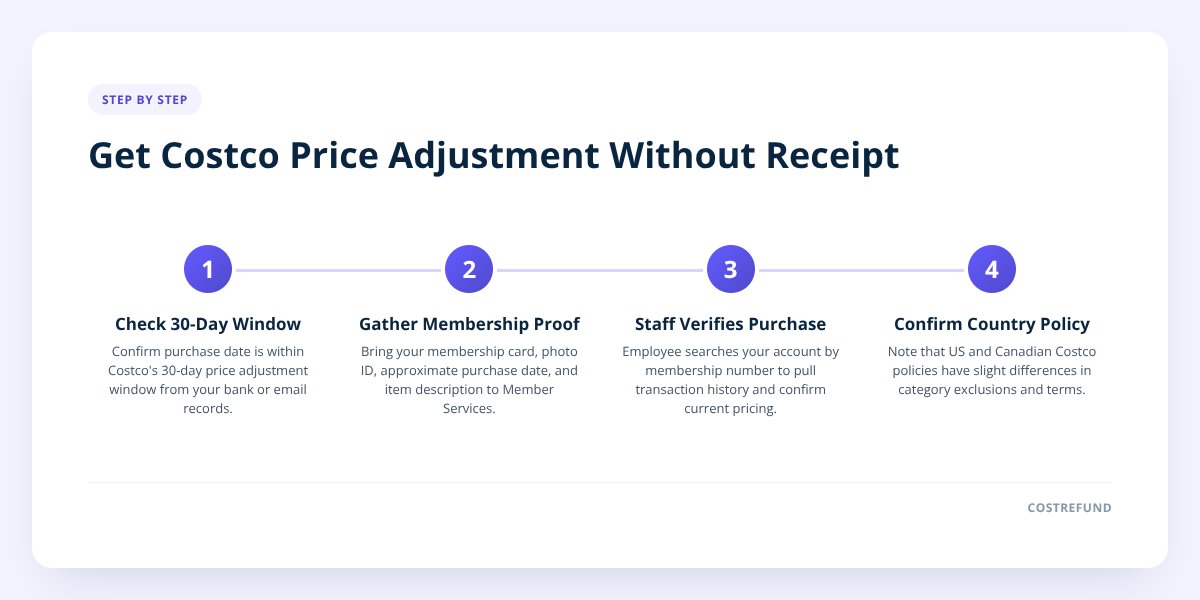
Before anything else, figure out how many days have passed since you bought the item. Costco's published policy gives members 30 days from the date of purchase to request a price adjustment if an item drops in price, according to customerservice.costco.com. Miss that window and Member Services has nothing to adjust, receipt or not.
This matters even more when you don't have a receipt, because you're relying on Costco's system (or your memory) to pin down the purchase date. If you're even slightly unsure, round down rather than up — showing up at day 28 beats trying to argue you're still eligible at day 35.
Don't skip this: the 30-day clock starts on the purchase date, not the date you noticed the price drop. If you spot a markdown on day 29, you need to act that day or the next — not "sometime soon."
A quick gut check before you head to Member Services:
- Check your bank or credit card statement for the transaction date.
- Check your email for an order confirmation if it was a Costco.com purchase.
- Check the Costco app or website under your order history if you're a member who shops online.
Step 2: Bring your membership card — it's your real proof of purchase
Your membership card number is what actually unlocks the lookup, not the paper receipt. Every purchase at Costco, in-warehouse or online, is tied to the membership number used at checkout. That means Member Services can search their system by your card and pull up a history of what you bought and when, even if you tossed the receipt weeks ago.
To make this go smoothly, have ready:
- Your physical membership card or the digital version in the Costco app.
- A government-issued photo ID that matches the name on the membership, since staff may ask to confirm identity.
- An approximate purchase date — narrowing it to a week makes the search much faster than "sometime last month."
- The item name or a photo of it, especially for generic-sounding products with multiple similar SKUs.
If you're on a household membership, note that purchases might show up under whichever card was actually swiped at checkout — if your spouse checked out, the transaction lives under their card number, not yours.
Step 3: Let staff verify the purchase through Costco's system
Once you're at Member Services, an employee searches your account's purchase history by membership number and date range, then matches the item against current pricing. Costco's internal system can see transaction details the same way a receipt would show them — item code, price paid, and date — so a missing paper slip doesn't block the search, it just means someone has to do the lookup manually instead of scanning a barcode.
This is also the point where in-warehouse and online purchases start to diverge:
| Purchase type | How Costco verifies it | What you need to bring |
|---|---|---|
| In-warehouse purchase | Staff search transaction history by membership number and approximate date | Membership card, photo ID, approximate date, item description |
| Costco.com order | Order history is already attached to your online account | Login to Costco.com or the Costco app; often no in-person visit needed |
| Costco.com order placed as a guest | Harder to verify without an order number or confirmation email | Order confirmation email, payment method used |
If your purchase was online, it's often faster to request the adjustment directly through your Costco.com account rather than visiting a warehouse — we cover that process in Costco Online Price Adjustment: How It Works.
Step 4: Know where US and Canadian policy differ
Both countries use the same core process — membership-number lookup, 30-day window — but a few details vary enough to matter. Costco Canada's published return and adjustment terms are on costco.ca, separate from the US site, and category-level exceptions don't always match across the border.
- Window length: both US and Canadian policy generally use a 30-day adjustment period, but always confirm the current figure for your category on the site that matches your home country.
- Category exclusions: certain items — think limited-time clearance, as-is, or special-buy marked items — are commonly excluded from adjustments in both countries, but the exact list isn't identical. Confirm on customerservice.costco.com for the US or costco.ca for Canada.
- Currency and cross-border shopping: a US member who happened to buy something while visiting a Canadian warehouse can't claim a price adjustment based on the US price, and vice versa — adjustments are tied to the warehouse's local pricing and currency.
- Online vs. in-warehouse split: both countries separate online and in-warehouse pricing, meaning a drop on Costco.com doesn't trigger an adjustment for something you bought in the warehouse, or the other way around.
If you're a Canadian member, it's worth asking Member Services directly whether your specific item category follows the standard window, since electronics and a handful of other categories sometimes carry shorter adjustment periods.
Why Costco might deny a receipt-free claim — and what to do next
The most common reason for denial is simple: the system can't find a matching transaction under your membership number for the date range you gave. This happens when the purchase was made under a different household member's card, when the date estimate is off by more than a few days, or when the item was paid for with cash and processed in a way that making the lookup harder.
Other common denial reasons:
- Outside the 30-day window. Once the window closes, there's no adjustment regardless of proof.
- Item is excluded from adjustments. Clearance, liquidation, and certain special-buy items typically don't qualify, receipt or not.
- Price difference is due to a bundle or configuration change, not a straight markdown — bundles get adjusted differently, which we explain in Costco Bundle Price Adjustment: What Refund You Can Get.
- The purchase was made under someone else's membership, including as a gift — see Can Someone Else Claim a Costco Price Adjustment on a Gift? for how that's typically handled.
- No transaction match at all, often because the date estimate is too broad or too far off.
If you're denied, ask the Member Services associate what specifically didn't match — a wrong date range is the easiest thing to fix on the spot by widening your search window by a few days in either direction. If the denial is about eligibility (wrong category, outside window), that's final under published policy, and escalating usually won't change the outcome since Costco determines eligibility and approval case by case.
What to do next
The entire receipt-free process hinges on knowing your purchase date and catching the price drop before day 30 — both of which are hard to track by memory across dozens of Costco trips a year. CostRefund's receipt scanning solves this by logging every purchase the moment you shop, so you always have a timestamped record even if the paper receipt ends up in the trash.
The app also tracks the 30-day window itself and sends an alert the moment an eligible item's price drops, so you're not trying to remember what you bought three weeks ago or guessing whether you're still in the window. Set up a CostRefund account before your next warehouse trip, or download the app and scan your last receipt today — CostRefund can spot a potential adjustment, but Costco always makes the final call on approval.
Checklist: Getting a Costco price adjustment without a receipt
- Confirm the purchase date fell within the last 30 days.
- Pull up your membership card or the Costco app's digital version.
- Bring a photo ID that matches the name on your membership.
- Narrow down the purchase to a specific week if you can't recall the exact date.
- Check whether the purchase was made under your card or a household member's card.
- Note the item name, size, or item code if you remember it.
- Visit Member Services for in-warehouse purchases, or check your account for online orders.
- Ask for the specific reason if your claim is denied, in case it's a fixable date mismatch.
- Scan your Costco receipts going forward so you're never without proof again.
Related articles
Blog by Segeo — new article every day.
Keep reading
- Costco Price Adjustments on Groceries: What QualifiesOctober 31, 20268 min read
- Does Costco's 30-Day Rule Apply to Flash Sales?October 22, 20268 min read
- Does Costco Use Dynamic Pricing? Here's the TruthOctober 19, 20268 min read
- Costco Food Return Policy: Groceries and PerishablesOctober 12, 20268 min read
- Costco Bundle Price Adjustment: What Refund You Can GetOctober 3, 20269 min read
- How Receipt-Scanning Apps Catch Costco Price DropsOctober 15, 20269 min read
Start Saving on Costco Today
CostRefund automatically monitors price drops and helps you claim refunds. Create your free account and never leave money on the table again.
Start Saving





