Costco Return Policy Without a Receipt: Does It Work?

Quick answer: Yes — Costco can usually look up your purchase using your membership number instead of a paper receipt, since every purchase is tied to your account. This works well for most items bought in-warehouse or online with your membership. It's less reliable for cash purchases by a guest, gift purchases, or items bought a long time ago. If the lookup fails, a warehouse manager still has discretion on how to handle the return.
Key takeaways
- Costco's membership system logs most purchases automatically, so staff can often pull up your purchase history by scanning your card instead of a receipt.
- Electronics, jewelry, and a few other categories have shorter return windows or extra documentation requirements even with a receipt — check the category rules on customerservice.costco.com before you go.
- Canadian Costco locations follow the same membership-lookup approach as the US, but specific category exceptions can differ, so always confirm locally.
- Tracking your receipts yourself closes the gap entirely — tools like CostRefund keep a digital copy so you're never stuck guessing what you paid or when you bought it.
Costco owes you money when prices drop
If something you bought gets cheaper within 30 days, you can claim the difference. CostRefund watches your receipts and tells you when you're owed.
Start freeWhat Costco actually needs to process a return without a receipt
Costco's general return policy, published at customerservice.costco.com, states that most merchandise can be returned at any time for a full refund, no receipt required for the return itself. What they need instead is a way to confirm the purchase happened and figure out what you paid.
That's normally your membership number — the account tied to your Costco card. Because nearly every purchase at a Costco warehouse or on Costco.com gets scanned against your membership at checkout, the company's systems can usually reconstruct your purchase history without a paper slip.
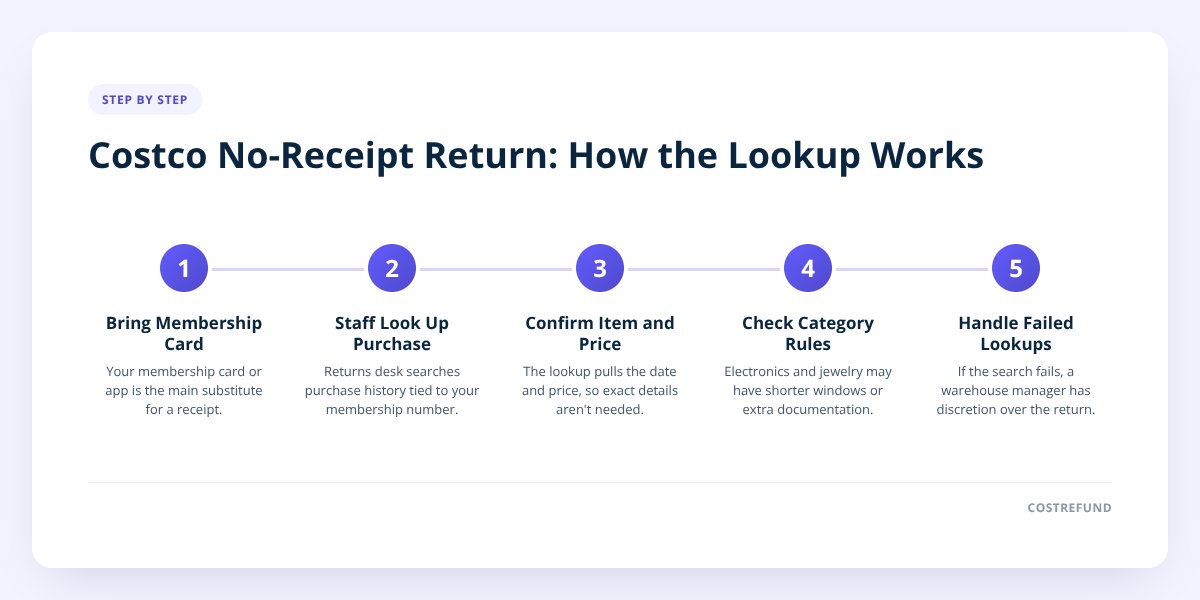
In practice, that means:
- Bringing your Costco membership card (physical or digital in the app) is the real substitute for a receipt.
- Staff at the returns desk can look up purchases made under that membership, often going back further than you'd expect.
- You don't need to remember the exact date or price — the lookup pulls that information for you.
Where this breaks down is when a purchase wasn't tied to your membership at all. If a friend used cash and bought something as a guest, or you lost access to the membership the purchase was made under, there's nothing for the system to find.
How a membership lookup stands in for a receipt
A membership lookup works because Costco ties the sale to your account number, not to a slip of paper. Think of your membership card as a running tab of everything you've bought — the receipt is just a printed copy of one line on that tab.
This is why Costco can honor returns on items purchased months or even years earlier, well past the point most people would have tossed the paper receipt. It's also why online orders are usually easier to track than in-warehouse ones: Costco.com keeps an order history tied to your account automatically, visible any time you log in.
Where the lookup gets harder:
- Gift purchases. If someone bought you a gift under their membership, Costco's system shows the purchase under their account, not yours. You may need the original purchaser present or willing to confirm the purchase.
- Cash or guest transactions. A non-member guest who paid cash at a participating location leaves a much thinner paper trail.
- Old memberships. If you've switched membership numbers, canceled and rejoined, or the purchase predates a system migration, the lookup may not reach back that far.
A related wrinkle: a receipt lookup only tells the warehouse what you bought, not necessarily whether it still qualifies under category-specific rules. We cover that angle in more detail in Costco Return Policy Without a Receipt: How It Works, including which categories need extra steps beyond a simple lookup.
Where US and Canadian policies differ
The membership-lookup method works the same way in both countries, but a few details differ enough to call out separately.
| Costco US | Costco Canada | |
|---|---|---|
| Lookup method | Membership number via card or app | Membership number via card or app |
| General return window | Most items: no time limit stated | Most items: no time limit stated |
| Electronics | Shorter window (check current policy) | Shorter window (check current policy) |
| Store credit vs. refund | Refund to original payment method, typically | Refund to original payment method, typically |
| Where to confirm | customerservice.costco.com | costco.ca customer service |
The structure is the same on both sides of the border: your membership is the backbone of the system, and category exceptions (electronics, appliances, certain seasonal goods) sit on top of the general policy. The specific exception list and time windows can differ by country and do change, so treat the table above as a starting point and confirm the current wording for your country before you go in.
If you're dealing with a specific category — appliances, furniture, alcohol — those often have their own rules layered on top of the general no-receipt-needed policy. We've broken a few of these down separately: Costco Appliance Return Policy for Fridges, Washers, Ranges and Costco Furniture Return Policy: Timeline and Exceptions both cover categories where the general "any time, no receipt" rule doesn't fully apply.
What to do if the warehouse says the lookup didn't work
If the front desk can't find your purchase, ask them to try a few alternate search angles before assuming the return is dead. Membership lookups depend on what details get entered, and staff have more than one way to search.
- Confirm the right membership number was searched — a typo or an old card number can cause a false miss.
- Check if the purchase was made under a household card linked to a different primary member on the account.
- Ask about payment-method lookup — some purchases can be traced through the card used to pay, as a backup to the membership search.
- Bring any digital trace you have — an order confirmation email, a bank or card statement showing the charge, or a photo of the item with its tags still attached.
- Ask for a supervisor if the front-line associate can't resolve it — managers often have more lookup tools or discretion on edge cases.
Don't skip this: a membership lookup is a convenience Costco built into its system, not a guaranteed substitute for a receipt in every case. For high-value items — electronics, jewelry, furniture — keeping your own copy of the receipt saves you from relying entirely on the lookup working.
This is the exact gap that trips people up with price adjustments too, not just returns. If a purchase isn't easy to find later, you can't prove what you paid when a price drops — which matters because Costco's price adjustment policy gives you a limited window to claim the difference. Our Costco Price Adjustment Without a Receipt: How To Get One post goes into how that specific process works when you don't have the slip.
Why keeping your own receipt record beats relying on a lookup
Relying on Costco's system to find your purchase is fine as a backup, but it puts you at the mercy of their records matching what you remember. Keeping your own digital copy removes the guesswork entirely — you know exactly what you paid, when, and under which membership, without needing a staff member to dig for it.
This is where CostRefund earns its keep. When you scan a Costco receipt into the app, it reads the line items automatically and keeps a running record you can pull up anytime — useful for a return, and essential for price adjustments, since Costco's price-adjustment window is time-limited and the only way to claim the difference is to show what you originally paid. CostRefund identifies when an item you bought has dropped in price and alerts you while the window's still open; Costco still makes the final call on eligibility and approval, but you're not scrambling to remember details the lookup might not catch.
It takes less effort than it sounds — scan the receipt once, and the record exists for the life of the adjustment window instead of living in a shoebox or a crumpled bag.
If you want to stop relying on Costco's lookup system entirely and keep your own record from day one, CostRefund lets you scan receipts as you shop and track both returns and price-adjustment eligibility in one place. You can create a free account and start tracking in a couple of minutes, or grab the app for iPhone or Android and scan your next receipt before it ever has a chance to go missing.
Checklist: Returning a Costco item without a receipt
- Bring your physical or digital Costco membership card to the returns desk.
- Ask staff to search your purchase under your membership number first.
- Mention the approximate date and item if you remember it, to narrow the search.
- Check if the item falls under a shorter return window — electronics and a few other categories differ.
- Bring any backup proof you have — a bank statement, order email, or photo of the item with tags.
- Ask about household-card or payment-method lookups if the first search comes up empty.
- Request a supervisor if the front-line associate can't locate the purchase.
- Confirm your country's current policy at customerservice.costco.com or costco.ca before you go, since category exceptions can change.
Related articles
Blog by Segeo — new article every day.
Keep reading
- Costco Small Appliance Return Policy: Blenders, Air FryersNovember 18, 20269 min read
- Costco Price Adjustment Without a Receipt: How To Get OneNovember 1, 20268 min read
- Costco TV Return Policy: What's Eligible and What Isn'tOctober 30, 20269 min read
- How Costco Jewelry Return Policy Differs From OthersOctober 29, 20268 min read
- Costco Food Return Policy: Groceries and PerishablesOctober 12, 20268 min read
- Costco Laptop Return Policy: 90-Day Rule for LaptopsOctober 6, 20268 min read
Start Saving on Costco Today
CostRefund automatically monitors price drops and helps you claim refunds. Create your free account and never leave money on the table again.
Start Saving