
Costco Price Adjustment: Online vs. In-Warehouse

Quick answer: Costco Canada honors price adjustments on both warehouse and Costco.ca purchases, but you have to match the purchase channel to the right process. In-warehouse buys are adjusted at the membership counter with your receipt, while Costco.ca purchases are adjusted by contacting Costco.ca customer service or using their online request process. Both generally fall within a 30-day window from your purchase date, but Costco Canada's published terms can differ slightly from Costco US on exclusions — always check customerservice.costco.ca for the current wording before you ask.
Key takeaways
- Costco Canada applies price adjustments within 30 days of purchase for most items, matching the general policy pattern Costco uses across its warehouses.
- In-warehouse purchases are adjusted in person at the membership desk or by phone to the warehouse; Costco.ca purchases go through Costco.ca's own customer service channel, not the warehouse.
- A price drop on Costco.ca does not automatically trigger an adjustment on something you bought in-warehouse, and vice versa — the two are tracked separately.
- Items marked as clearance, limited-time-only, or special-event pricing are commonly excluded from adjustments; always confirm the specific item's status before submitting a claim.
Costco owes you money when prices drop
If something you bought gets cheaper within 30 days, you can claim the difference. CostRefund watches your receipts and tells you when you're owed.
Start freeHow does Costco Canada's 30-day price adjustment window work in warehouse?
If you bought an item inside a Costco warehouse in Canada and its price drops within 30 days, you can typically request the difference refunded to your original payment method. This mirrors the standard price-adjustment pattern Costco uses in its warehouses generally, though you should confirm current terms on customerservice.costco.ca since policies can be updated.
The process in-warehouse is simple on paper:
- You bring your receipt (paper or digital) to the membership counter.
- A staff member checks the current shelf or ticketed price on that item.
- If it's lower than what you paid, and the item still qualifies, they process the refund for the difference.
The catch is timing and proof. Costco warehouses don't track your purchase history for you — the clock starts the day you bought the item, not the day you notice the price dropped. If you're three weeks into a 30-day window and haven't checked prices since your trip, you could be sitting on money you don't know is owed back to you.
This is exactly the gap that receipt tracking is built to close. CostRefund lets you scan a Costco receipt once, and it watches that purchase for price drops for the rest of the adjustment window, alerting you the moment something you bought is now cheaper — while there's still time to act.
Don't skip this: the 30-day window is counted from your purchase date, not from when you discover the lower price. If you wait too long to check, the adjustment opportunity disappears even if the price is still lower today.
What's different about Costco.ca online price adjustments?
Costco.ca purchases are adjusted through Costco's online customer service, not at the warehouse counter, because online orders live in a separate system from in-store transactions. You generally can't walk into a Costco warehouse with an online order confirmation and expect the membership desk to process that adjustment — the warehouse system doesn't have visibility into your Costco.ca order.
Here's how the two channels typically diverge:
| In-Warehouse Purchase | Costco.ca Purchase | |
|---|---|---|
| Where you request it | Membership counter, in person or by phone | Costco.ca customer service |
| What you need | Warehouse receipt | Order confirmation / order number |
| What triggers eligibility | Shelf/ticket price drop at that warehouse | Costco.ca listed price drop |
| Typical window | 30 days from purchase | 30 days from purchase (confirm current terms) |
| Cross-channel adjustment | Not standard — a Costco.ca price drop doesn't apply to a warehouse buy | Not standard — a warehouse price drop doesn't apply to an online buy |
That last row trips up a lot of shoppers. If you bought a TV in-warehouse in Mississauga and the identical model drops in price on Costco.ca two weeks later, that's not automatically a match for an adjustment — the two price structures are tracked independently, and Costco Canada's documented terms govern which comparisons actually qualify. If you want the deeper mechanics of how the online process is structured, we cover it in Costco Online Price Adjustment: How It Works.
One more online-specific wrinkle: shipping and handling charges are generally treated separately from the item price itself in most adjustment processes, so don't assume a shipping fee drop counts the same way a product price drop does. Confirm this directly with Costco.ca customer service for your specific order.
What documentation do you actually need for each type of claim?
For a warehouse claim, you need the original receipt showing the item, the price you paid, and the purchase date — a digital receipt from the Costco app or a membership-linked purchase history generally works just as well as paper. For a Costco.ca claim, you need your order number or order confirmation email, since that's how their customer service team pulls up the transaction.
A practical checklist for either channel:
- Locate your receipt or order confirmation before you contact anyone — don't start the conversation and then go hunting.
- Note the exact item description or model/UPC number, since generic descriptions can slow down the match-up process.
- Screenshot or note the current lower price, including the date and where you saw it (warehouse shelf tag or Costco.ca listing).
- Confirm the item isn't marked clearance, Manager's Special, or limited-time-only, since these are commonly excluded.
- Check how many days have passed since your purchase date, not since you noticed the price drop.
- Keep your membership number handy, since most claims are tied to your account regardless of channel.
If your receipt situation is messier than that — lost paper receipt, buried in email, no idea which warehouse you bought it at — we've gone through options for that scenario in Costco Price Adjustment Without a Receipt: How To Get One.
This is also where a lot of people quietly lose money. Keeping a mental tally of what you bought, where, and for how much across a month of Costco trips and online orders isn't realistic for most people. Uploading receipts to an app as you shop, rather than trying to remember three weeks later, is the difference between catching a price drop and missing it entirely.
Why does Costco Canada deny some price adjustment requests?
Costco Canada can deny a price adjustment when the item falls outside standard eligibility — most often because it was on clearance, part of a limited-time promotion, or because the request came in after the 30-day window closed. These exclusions aren't unique to Canada; they follow the general pattern Costco applies across its warehouses, but the exact list of what's excluded should always be confirmed against customerservice.costco.ca since it can be updated.
Common reasons a request gets turned down:
- The window has closed. More than 30 days passed between your purchase date and your request.
- The item was clearance-priced or a Manager's Special. These are typically marked down to clear inventory and are commonly excluded from further adjustment.
- It was a limited-time event price, like a holiday weekend promotion or a one-day doorbuster, rather than a standing price drop.
- The comparison crossed channels — comparing a warehouse purchase to a Costco.ca price, or the reverse, when the two aren't treated as equivalent.
- The item was a special order or seasonal item no longer in regular rotation, which can fall outside standard adjustment eligibility.
If this happens to you and you believe the denial was a mistake — say, the item wasn't actually marked clearance, or you're within the window but got turned down anyway — Costco Canada typically allows you to ask for a second review, usually by speaking with a manager or supervisor rather than the first staff member you dealt with. We walk through how to build that case in Costco Price Adjustment Denied? How to Appeal It.
It's worth noting that grocery and perishable items follow their own logic too, since shelf prices can shift week to week for reasons unrelated to a standard "price adjustment" event. If groceries are a regular part of your Costco trips, Costco Price Adjustments on Groceries: What Qualifies breaks down what's actually eligible there.
What if you shop both Costco.ca and in-warehouse regularly?
If you split your shopping between Costco.ca and the warehouse, the practical challenge isn't understanding the rules — it's remembering which purchase went through which channel, and checking both for price drops before each 30-day window closes. Most people don't have the bandwidth to track a warehouse TV purchase and a Costco.ca order for patio furniture against two separate countdowns at once.
This is the exact problem CostRefund was built around. You scan or upload your Costco receipts — whether from a warehouse trip or forwarded from a Costco.ca order confirmation — and the app tracks each item through its own adjustment window, showing what you paid, the current price, and how many days are left before the opportunity closes. When a tracked item drops in price, you get an alert while there's still time to act, instead of finding out a month later that you missed it.
To be clear: CostRefund identifies when a purchase may qualify for a price adjustment — Costco makes the final call on eligibility and approval. But catching the drop in the first place is usually the hardest part, and that's the part worth automating.
If you're ready to stop manually re-checking prices on everything you've bought, create a free account and upload your first receipt — the free plan includes one receipt scan a month plus refund alerts, so you can see how the tracking works before deciding if you want more.
Checklist: getting a Costco Canada price adjustment
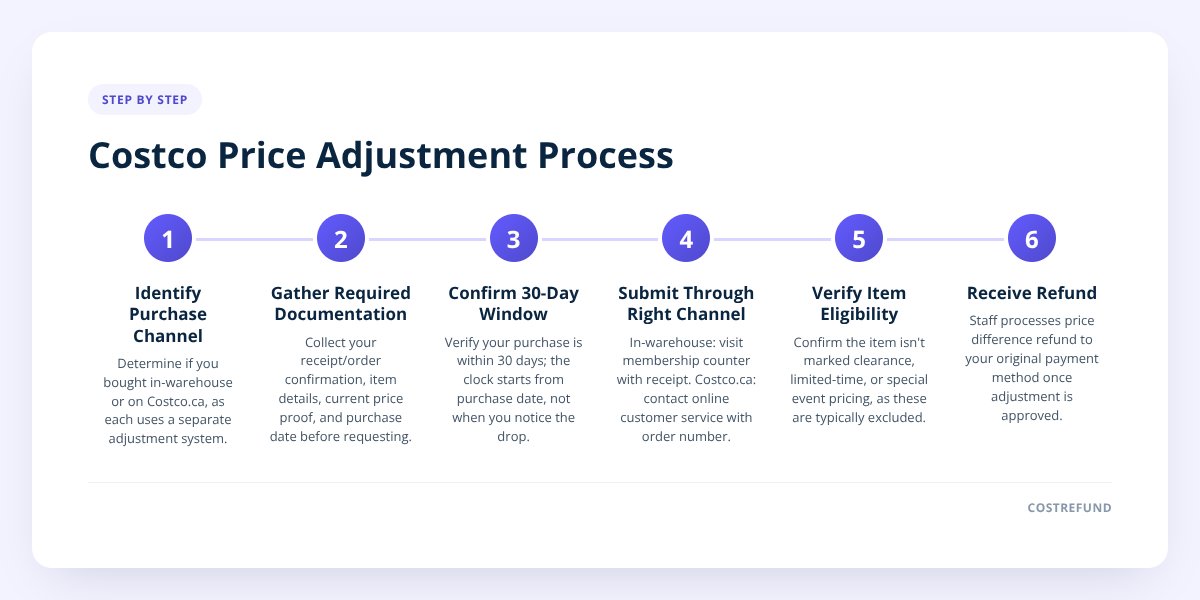
- Identify whether your purchase was in-warehouse or on Costco.ca — the process differs for each.
- Pull your receipt (warehouse) or order confirmation (Costco.ca) before contacting anyone.
- Confirm the purchase date and count the days to make sure you're inside the 30-day window.
- Check the item isn't marked clearance, Manager's Special, or a limited-time event price.
- Note the current lower price, where you saw it, and the date.
- Contact the warehouse membership counter for in-store buys, or Costco.ca customer service for online orders.
- Ask for a manager review if your request is denied and you believe it qualifies.
- Upload the receipt to CostRefund so future price drops on that item trigger an alert automatically.
Related articles
Blog by Segeo — new article every day.
Keep reading
- Costco Furniture Return Policy: Timeline and ExceptionsNovember 6, 20268 min read
- Costco Price Adjustment Processing Time: What to ExpectSeptember 27, 20267 min read
- Costco vs Best Buy Price Adjustments on ElectronicsOctober 23, 20269 min read
- Does Costco's 30-Day Rule Apply to Flash Sales?October 22, 20268 min read
- Does Costco Use Dynamic Pricing? Here's the TruthOctober 19, 20268 min read
- How to Cancel Costco Membership and Get RefundOctober 14, 20268 min read
Start Saving on Costco Today
CostRefund automatically monitors price drops and helps you claim refunds. Create your free account and never leave money on the table again.
Start Saving