

Receipt Scanning for Costco Price Adjustments: A Setup Guide

Quick answer: Receipt scanning for 30-day price adjustment tracking means uploading a photo of your Costco receipt to an app that reads the line items and watches those specific products for price drops during Costco's adjustment window. Instead of writing down what you bought and checking prices by hand, the app flags a drop automatically and tells you how many days you have left to act. CostRefund's version is free for one scan a month, with unlimited scanning on paid plans starting at $4.99/month — but Costco, not the app, decides whether any adjustment is actually approved.
Key takeaways
- Costco's price adjustment window is commonly cited as 30 days from the purchase date — confirm the current policy at customerservice.costco.com before relying on it.
- Receipt scanning apps read your purchase line items from a photo, then monitor those products for a price drop while the window is still open.
- CostRefund's free plan includes one receipt scan per month; unlimited scanning, analytics, and price tracking require the $4.99/month or $29.99/year plan, both with a 3-day free trial.
- The retailer approves or denies every adjustment — no tracking app, including CostRefund, can guarantee a refund.
Costco owes you money when prices drop
If something you bought gets cheaper within 30 days, you can claim the difference. CostRefund watches your receipts and tells you when you're owed.
Start freeHow does receipt scanning actually work?
You take a photo of your Costco receipt, and the app's item detection reads each line — product name, price paid, date — and turns it into a trackable entry. From there, the app checks that item's price against current listings for as long as the adjustment window stays open.
This matters because manually tracking even five or six purchases means remembering what you bought, when you bought it, and then checking Costco's website or app every few days before the window closes. Most people forget by day 10. A scanning tool removes that memory problem entirely.
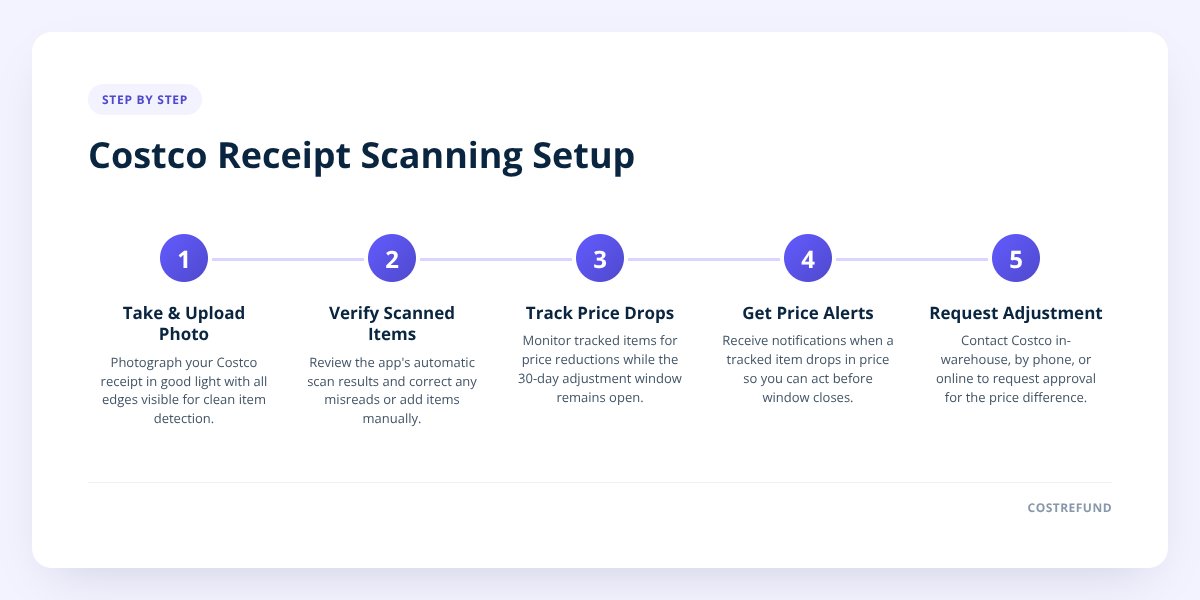
With CostRefund specifically, here's what happens after you upload:
- The app reads the receipt and lists each eligible item automatically.
- You can tap any item to correct it if the scan misreads something, or add items manually.
- The app shows the price you paid, the current price, the potential saving, and the days remaining in the window — all in one view.
- When a tracked item drops in price, you get an alert while there's still time to request the adjustment.
That last point is the actual value. A price drop that happens on day 28 is still useful information — but only if you find out on day 28, not day 34. We covered the mechanics of this detection process in more detail in How Receipt-Scanning Apps Catch Costco Price Drops.
One nuance worth flagging early: "same item" isn't always obvious. A product that's repackaged, resized, or swapped for a new model number may not count as the same item for adjustment purposes. We go deeper on that question in Costco Price Adjustment: What Counts as the Same Item?
What does receipt scanning cost?
Core receipt scanning starts at $0. CostRefund's free tier gives you one receipt scan per month, refund alerts, manual entry, and a shopping list for your next warehouse trip — no credit card required to sign up.
If you shop at Costco often enough that one scan a month doesn't cover your receipts, the paid tiers unlock unlimited scanning:
| Plan | Price | What you get |
|---|---|---|
| Free | $0 | 1 receipt scan/month, refund alerts, manual entry, shopping list |
| Monthly | $4.99/month | Unlimited scanning, spending analytics, price tracker, ad-free, 3-day free trial |
| Annual | $29.99/year | Same as monthly, billed yearly, 3-day free trial |
Both paid plans start with a 3-day free trial, so you can test unlimited scanning on a big shopping trip before committing. Subscriptions are managed wherever you signed up — through the app store or on costrefund.com — and cancellations go through that same channel.
Don't skip this: No app, including CostRefund, issues or guarantees a refund. CostRefund identifies that a tracked item has dropped in price and alerts you — Costco makes the final call on whether an adjustment is approved.
How do I prepare before my next Costco trip?
Preparation here isn't about the shopping trip itself — it's about making sure every receipt actually gets tracked instead of sitting in a bag until the window closes. The setup takes a few minutes and pays off every time you shop afterward.
Checklist: set up receipt tracking before you shop
- Create a free account at costrefund.com/start or download the app at costrefund.com/download.
- Set your home warehouse by country and state so pricing comparisons match your local store.
- Decide if you'll scan in-store right after checkout or at home — scanning sooner means fewer lost or faded receipts.
- Photograph receipts in good light, flat, with all four edges visible, so item detection reads them cleanly.
- Check the scanned items against your actual receipt and correct any misread line.
- Note your country explicitly if you shop at both Costco US and Costco Canada — the adjustment window can differ.
- Hold onto the physical or digital receipt until the adjustment is either claimed or the window closes, since Costco may ask for it.
That last point matters more than people expect. The app tracks the purchase, but Costco's process for actually requesting the adjustment — in warehouse, by phone, or online — still runs through the retailer, not the app. If you bought online, the process has its own quirks we walk through in Costco Online Price Adjustment: How It Works.
US vs. Canada: does the policy work the same way?
Mostly, but the details can differ, and it's worth confirming rather than assuming. Costco publishes separate policy pages for the US and Canada, and historically the stated adjustment window has been similar in length, but exact wording, eligible categories, and process steps aren't identical between the two sites.
- United States: Check the current policy at customerservice.costco.com for the exact window length and which categories (tires, electronics, jewelry, etc.) are excluded or treated differently.
- Canada: Costco.ca maintains its own version of the policy. If you shop cross-border — say you have a membership used while traveling — don't assume a rule confirmed for one country applies in the other.
CostRefund tracks purchases from both Costco US and Costco Canada, and the app asks you to set your home warehouse by country specifically so it applies the right comparison. If you're tracking tires, those have category-specific rules on both sides of the border worth reading before you buy — we detail them in Costco Tires Price Adjustment: What You Need to Know.
What mistakes cost people the most missed adjustments?
The single biggest mistake is simply forgetting the receipt exists by the time the price drops. Here are the ones that come up again and again:
- Letting receipts pile up unscanned. A photo taken at checkout takes ten seconds. A receipt stuffed in a bag for three weeks is often faded, lost, or forgotten entirely by the time you'd need it.
- Assuming sale items don't qualify. Whether a price adjustment applies to something already on sale isn't always obvious, and the answer can depend on the specific promotion. We cover this exact question in Costco Price Adjustment on Sale Items: Does It Apply?
- Checking prices manually once, then forgetting. A single price check on day 3 tells you nothing about day 22. Prices move throughout the window, which is the entire reason automated tracking exists.
- Not correcting a misread line item. Receipt scanning is convenient, but it's not infallible — a smudged receipt or unusual item code can misread. Tap into the item and fix it so you're tracking the right product.
- Treating Costco Business Center or Marketplace purchases like regular warehouse purchases. Both have rules that differ from a standard in-warehouse trip. See Costco Business Center Price Adjustment: How It Differs and Does Costco Marketplace Price Adjustment Apply to Sellers? if either applies to you.
- Forgetting the window has an end date at all. It's easy to assume you can request an adjustment "whenever you get around to it." The window closes, and once it does, the opportunity is gone regardless of how much the price dropped.
The common thread: every one of these mistakes is a tracking failure, not a shopping failure. You bought the right thing at a fair price — you just lost the chance to get money back because nobody was watching the clock.
Getting started with tracking that doesn't rely on memory
Receipt scanning solves a genuinely tedious problem: remembering dozens of purchases, prices, and deadlines across a month of Costco trips. CostRefund's receipt scanning reads your items automatically, tracks the 30-day-style window per purchase, and sends an alert the moment a tracked item drops — so you find out while there's still time to ask, instead of finding out too late. Start tracking for free at CostRefund and see what's sitting in your recent receipts right now.
Checklist: set up receipt scanning for price adjustments
- Create a free CostRefund account or download the app.
- Set your home warehouse by country and state.
- Photograph each receipt flat, in good light, right after checkout.
- Review the scanned items and correct any line the app misread.
- Confirm Costco's current adjustment window at customerservice.costco.com for your country.
- Watch for the in-app alert and request the adjustment before the window closes.
- Keep the original receipt until the adjustment is resolved.
Related articles
Blog by Segeo — new article every day.
Keep reading
- Costco Starlink Price Adjustment: How to Track RefundsOctober 26, 20269 min read
- Costco Food Return Policy: Groceries and PerishablesOctober 12, 20268 min read
- Costco Optical and Pharmacy Price Adjustments: Eligible?October 20, 20268 min read
- Costco Bulk Purchases: How Price Adjustments Really WorkSeptember 22, 20269 min read
- Costco Price Adjustment: A Guide to Seasonal Item RefundsSeptember 15, 20268 min read
- Costco Business Center Price Adjustment: How It DiffersOctober 21, 20269 min read
Start Saving on Costco Today
CostRefund automatically monitors price drops and helps you claim refunds. Create your free account and never leave money on the table again.
Start Saving





