
What Qualifies for Costco's 30-Day Price Adjustment?

Quick answer: Costco's 30-day price adjustment applies to most items bought in-warehouse or on Costco.com in the US, if the item drops in price within 30 days of your purchase date — you bring your receipt (or look it up online) and Costco refunds the difference. It does not apply to gas, pharmacy, alcohol in some states/provinces, special-order items, or anything marked as a one-time or clearance buy. Costco Canada follows the same general 30-day idea but has its own published terms, so always check customerservice.costco.ca if you shop there.
Key takeaways
- The 30-day clock starts from your purchase date, not the date you open the box or the date it shows up if you ordered online for delivery.
- Gas, pharmacy items, alcohol (where state or provincial law restricts it), and special-order purchases are generally excluded from price adjustments, per Costco's published customer service policy.
- Online and in-warehouse purchases are both eligible, but you may need different proof — a warehouse receipt versus an online order confirmation — depending on where you bought it.
- Tools like CostRefund's receipt scanning can track your 30-day window automatically and alert you the moment a tracked item drops, so you're not stuck checking prices yourself every few days.
Costco owes you money when prices drop
If something you bought gets cheaper within 30 days, you can claim the difference. CostRefund watches your receipts and tells you when you're owed.
Start freeStep 1: Confirm Your Purchase Type Actually Qualifies
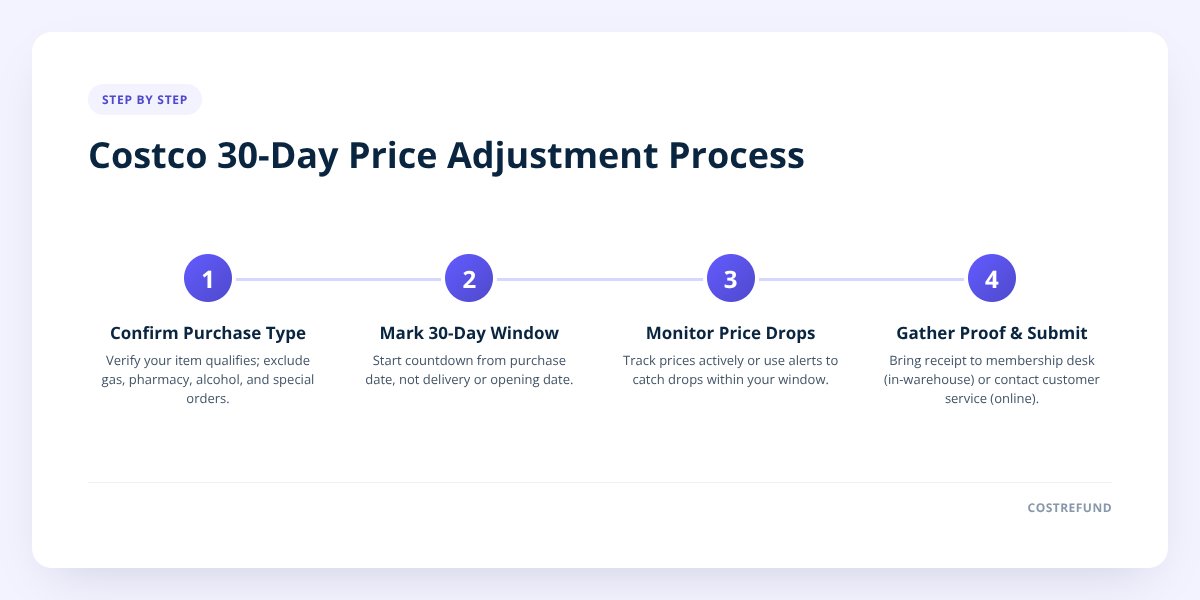
Start by figuring out whether what you bought falls under Costco's general merchandise policy or one of its carve-outs. Most physical goods bought in a Costco warehouse or through Costco.com — electronics, furniture, clothing, home goods, tires, mattresses — fall under the standard 30-day price adjustment window, according to Costco's customer service policy published at customerservice.costco.com.
A few categories work differently and are worth knowing before you get your hopes up:
- Gas — not eligible for price adjustments; pump prices change too often for this to apply.
- Pharmacy items — prescriptions and many pharmacy products are excluded.
- Optical — glasses and contacts purchased through the Costco Optical department often follow separate rules; check with your local optical center.
- Alcohol — eligibility can depend on your state or province's liquor laws, so confirm locally.
- Special orders and custom items — things made or ordered to your specifications (certain furniture, custom countertops) typically don't qualify.
- Tires — Costco tires can qualify for price adjustments, but tire pricing and installation packages sometimes bundle services that complicate the math. We cover the details in our guide on Costco Business Center price adjustments if you're buying through that channel instead of a regular warehouse.
If you're not sure which bucket your purchase falls into, the safest move is to ask a Costco member services desk directly, since category rules can shift without a lot of fanfare.
Step 2: Know Exactly When Your 30-Day Window Starts and Ends
Your window starts on the date of purchase, not the date you used the item, opened the packaging, or — for online orders — the date it arrived. This trips people up constantly. If you bought a laptop on October 1 and it didn't ship until October 5, your 30 days still count from October 1, based on how Costco's policy counts the adjustment period from the transaction date.
Here's how the countdown typically plays out:
| Day | What's happening |
|---|---|
| Day 0 | You make the purchase (in-warehouse or online) |
| Days 1–29 | Price adjustment window is open; watch for drops |
| Day 30 | Last day to request your adjustment |
| Day 31+ | Window is closed; Costco is not obligated to honor the adjustment |
Don't skip this: mark the purchase date, not the delivery date, as day zero. A week lost to shipping time is a week you don't get back on the other end — the 30 days don't pause or extend because an order took time to arrive.
Costco's customer service policy doesn't require you to request the adjustment on exactly day 30 — you can do it any time within the window, including the same day you notice the price drop. The key is simply not letting the 30 days run out before you ask.
Step 3: Track the Price, Not Just the Date
Knowing your deadline is only half the job — you also need to catch the actual price drop while it's happening. This is the part that trips up even organized shoppers, because Costco doesn't notify you when something you bought goes on sale. You have to notice it yourself, and prices can change multiple times in a 30-day stretch.
A few ways people try to keep tabs on this manually:
- Checking the Costco app or website every few days for items they recently bought
- Walking the same aisle on their next warehouse trip to eyeball the shelf tag
- Setting a calendar reminder for "day 29" and hoping the price happened to drop that week
- Asking a friend who shops at a different warehouse to check for them
All of these work occasionally. None of them work reliably, because a price can drop on day 6 and climb back up by day 20, and if you weren't looking on day 6, you missed it.
This is exactly the gap CostRefund's receipt scanning and price-drop monitoring are built to close. You upload your Costco receipt, and the app tracks the items against current pricing for as long as your adjustment window stays open — showing what you paid, what it's selling for now, the potential saving, and how many days you have left. When a tracked item drops, you get an alert while there's still time to act, instead of finding out on day 35 that you missed it by a week.
Step 4: Gather What You Need and Submit the Request
How you claim your adjustment depends on where you bought the item. In-warehouse purchases are handled at the membership desk; online purchases go through a different path.
For in-warehouse purchases:
- Bring your original receipt (paper or the digital copy in the Costco app).
- Note the current lower price — a photo of the shelf tag or a screenshot helps.
- Visit the membership counter and ask for a price adjustment.
- Be ready with your membership number if the receipt isn't handy.
For online purchases:
- Log into your Costco.com account and find the order in your purchase history.
- Use Costco's online price adjustment request process rather than visiting in person.
- Have the order number and current listed price ready.
We go deeper on the online-specific steps in our guide to the Costco online price adjustment form if you bought through Costco.com and want the exact clicks.
One more wrinkle: gifts and bundles complicate this process. If someone else bought the item for you, or if it was part of a multi-item bundle deal, the adjustment math isn't always a straight subtraction. We've broken both of those scenarios down separately — see Costco Bundle Price Adjustment: What Refund You Can Get and Can Someone Else Claim a Costco Price Adjustment on a Gift? for how those situations are typically handled.
Step 5: Know What Happens If Costco Says No — or the Window Closes
If your adjustment request is denied, you do have options, but they depend on the reason for the denial. Costco staff sometimes make judgment calls at the register, and a denial isn't always the final word — we cover how to push back appropriately in Costco Price Adjustment Denied? How to Appeal It.
If the 30 days have simply run out, the standard price adjustment window is closed, and Costco's published policy doesn't require honoring a late request. That said, a few adjacent paths exist depending on what you bought:
- Mattresses fall under a much longer return window — Costco's mattress return policy allows returns up to 120 days, which is a separate mechanism from price adjustment but worth knowing if price was only part of your dissatisfaction. Details are in our Costco Mattress Return Policy guide.
- Flash sales and limited-time online deals sometimes raise the question of whether the 30-day rule even applies the same way — we answer that directly in Does Costco's 30-Day Rule Apply to Flash Sales?
- Lost your receipt? You're not automatically out of luck — Costco can often look up purchases tied to your membership number. We explain how in Costco Price Adjustment Without a Receipt: How To Get One.
A Note on Costco Canada
Costco Canada operates under its own published policies at customerservice.costco.ca, and while the general 30-day price adjustment concept is similar to the US, specific exclusions, provincial alcohol laws, and process details can differ. If you shop at a Canadian warehouse, don't assume a US-specific exception (or inclusion) automatically applies north of the border — confirm directly with Costco Canada's customer service page before counting on a refund.
Tracking all of this by memory — purchase dates, current prices, which category rules apply, whether you're in the US or Canada — is a lot to hold in your head across a month of Costco runs. CostRefund's app handles the tracking side: scan your receipt once, and it watches eligible items through the window and tells you when a price drop makes an adjustment worth requesting, for shoppers in both countries.
Ready to stop guessing and start tracking? Create a free CostRefund account or download the app and upload your next Costco receipt before this month's purchases age out of their window.
Checklist: Claiming a Costco 30-Day Price Adjustment
- Confirm your item isn't in an excluded category — gas, pharmacy, optical, alcohol, or special orders.
- Note your exact purchase date as day zero, not the delivery or ship date.
- Check the current price regularly, or scan your receipt into a tracking app so it's monitored for you.
- Screenshot or photograph the lower price as backup if you plan to visit the membership desk.
- Locate your receipt — paper, the Costco app, or your Costco.com order history.
- Request the adjustment in-warehouse at the membership counter, or online through your account for Costco.com orders.
- Double-check which country's policy applies if you're near a US-Canada border and shop both sides.
- Act before day 30 — once the window closes, the standard adjustment isn't available.
Related articles
Blog by Segeo — new article every day.
Keep reading
- Costco Business Center Price Adjustment: How It DiffersOctober 21, 20269 min read
- Costco Price Adjustment: What Counts as the Same Item?October 17, 20269 min read
- Does Costco Marketplace Price Adjustment Apply to Sellers?October 16, 20267 min read
- Walmart Price Adjustment vs Costco: What's the Difference?October 5, 20268 min read
- Can Someone Else Claim a Costco Price Adjustment on a Gift?October 1, 20269 min read
- Costco vs Best Buy Price Adjustments on ElectronicsOctober 23, 20269 min read
Start Saving on Costco Today
CostRefund automatically monitors price drops and helps you claim refunds. Create your free account and never leave money on the table again.
Start Saving